How-to · Insurance claims · Bevaya · Oct 22, 2026
Pilot Bevaya’s claim indexing agent with Highlight Mode review, and have the operations lead approve go-live
Bevaya, the platform Roots Automation launched in May 2026, sells AI agents that read and sort insurance documents and send uncertain items to human review queues. Its Highlight Mode shows the exact spot on the page behind each extracted field. This page shows how to pilot the claim indexing agent for one week, measure how often reviewers correct it, and have the operations lead approve go-live in writing.
Who this is for
Claims operations leads, review queue owners, and claims technology leads at insurers, brokers, and third-party administrators who handle large volumes of incoming claim documents. The job here is a one-week indexing pilot with people reviewing the agent’s work and a named person approving go-live. This page explains features and an operations process. It is not coverage, claims, or legal advice.
How to do it
This is a how-to, not a ranking of insurance tools. Per the Bevaya AI review, Roots Automation relaunched as Bevaya on 28 May 2026; Roots Automation, Inc. remains the legal entity. The Claim Indexing agent reads documents from email, mailroom scans, broker portals, and file drops, classifies each page, captures claim-tying fields such as claimant and claim and policy numbers, and routes the file. Bevaya said in January 2026 that its Document Indexing Accelerator was validated by Guidewire for ClaimCenter on Guidewire Cloud. Work goes straight through only when each field clears its confidence threshold; anything else goes to a review queue, where Highlight Mode shows the source spot and an audit trail records each correction. InsurGPT is Bevaya’s name for its models. Bevaya’s accuracy figures are its claims. The ground rule: indexing errors are quiet, so nothing runs unattended until the operations lead approves go-live.

1. Index one week of claim documents with reviewers on the Highlight Mode queue
What it is: Run one normal week of incoming claim documents through the indexing agent in staging or with every item reviewed. Reviewers work the queue in Highlight Mode and correct any wrong field.
- Pick one line of business and one intake channel for the week.
- Route every indexed document to the review queue for the pilot, not just low-confidence ones.
- Have reviewers check document type, claimant, claim number, and policy number in Highlight Mode.
- Have the claims operations lead check fifty indexed documents against the claim files.
The pilot covers one week of auto claim email: about 2,400 pages. Reviewers correct document type on a set of repair estimates filed as invoices and fix claim numbers on a few faxed pages. The claims operations lead checks fifty documents against claim files and finds one legal demand routed to the wrong adjuster.
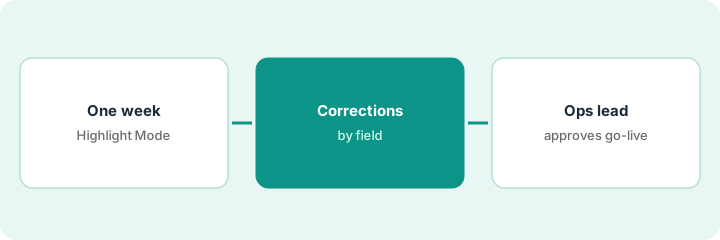
Run one week of one channel’s claim documents through Bevaya’s indexing agent with every item reviewed in Highlight Mode, and have the claims operations lead check fifty against the claim files.
2. Track the correction rate by field
What it is: The confidence thresholds decide how much work a person never sees. The review queue owner tracks how often reviewers change each field and lowers a threshold only on fields reviewers almost never change.
- Export corrections from the audit trail by field and document type.
- List the fields reviewers changed most often.
- Keep legal demands and similar high-risk document types in review regardless of confidence.
- Have the review queue owner write the starting threshold per field with the evidence attached.
The queue owner exports one week of corrections. Policy number is almost never changed; document type is changed on about one page in thirty, mostly estimates versus invoices. She keeps document type in review for estimates and writes a threshold for policy number with the week’s numbers attached.
Have the review queue owner export corrections by field for the pilot week, keep high-risk document types in review, and write each starting threshold with the evidence.
3. The operations lead approves go-live after a staging test and the price math
What it is: Moving a flow to production is when the agent starts acting on real claims. The operations lead approves only after a staging test on past documents with written results and a check of what the agent will cost.
- Run the flow in staging on one hundred past documents with known correct indexing.
- Write the results: correct, corrected, and wrongly routed.
- Do the per-agent price math against the volume you will run.
- Have the operations lead approve the production publish in writing; Bevaya’s audit log records it.
The staging test on one hundred past documents routes 96 correctly; the four misses are all handwritten forms. The operations lead approves go-live for typed documents only, keeps handwritten forms in review, and records the decision with the test results.
Have the operations lead approve go-live only after a staging test on one hundred past documents with written results and a check of the per-agent price against your volume.
Pricing context (October 2026)
Bevaya publishes a starting price, rechecked on its pricing page on Oct 22, 2026 (below). Per the Bevaya AI review, credits are pooled across all agents and the page shows multi-agent discounts; the review found the page lists two different included-credit figures, so confirm included credits in writing. Bevaya’s accuracy, deployment, and capacity figures are vendor claims. Dated October 2026.
Checked Oct 22, 2026 on the vendor’s own site: Bevaya’s pricing page says “Each AI agent is $4,000 / month,” billed annually, with credits added to one shared balance and discounts of 5% for two agents, 10% for three, and up to 20% for four or more. Confirm included credits in writing; our review found two different figures on the page.
Uncertainty: The only prices this site sells here are the optional $9 AI toolkit spreadsheet and $19 AI toolkit audit.
When this helps (honest take)
Useful when you receive a high volume of claim documents, a review queue owner will watch corrections, and the operations lead will approve go-live on written test results.
Not useful when your document volume is small, nobody owns the review queue, or you would let the agent run unattended before a staging test.
Related options (educational)
| Need | Where to look | Why |
|---|---|---|
| Insurance AI agents for claims, underwriting, and servicing documents | Bevaya AI | Primary path; published starting price |
| Claims system or add-on with multi-agent AI | Five Sigma AI | Different tool |
| Core claims and policy systems | Guidewire vs Duck Creek | Where indexing lands |
| Where insurance ops tools fit | Stack map: insurance ops | Broader map |
FAQ
Is Bevaya the same company as Roots Automation?
Yes. Per our review, Bevaya launched on 28 May 2026 as the company’s new platform and brand; Roots Automation, Inc. remains the legal entity.
What is Highlight Mode?
In Bevaya’s review queues, Highlight Mode shows the exact spot on the source page behind each extracted field, and corrections are recorded in an audit trail.
Does Bevaya work with Guidewire?
Bevaya says its Document Indexing Accelerator was validated by Guidewire and is available to ClaimCenter users on Guidewire Cloud through the Guidewire Marketplace (7 January 2026).
What does Bevaya cost?
Bevaya’s pricing page says each AI agent is $4,000 a month, billed annually, with pooled credits and multi-agent discounts (checked Oct 22, 2026). Confirm included credits in writing.
Optional next step
If you want a one-page toolkit map for the tools you already pay for, use the optional $9 AI toolkit spreadsheet. If you want a short review of seat waste and unused tools, use the optional $19 AI toolkit audit. Neither is required to follow this how-to.