How-to · Product analytics · Amplitude · Oct 13, 2026
Set one Amplitude funnel alert and name who acts on it
Most analytics alerts fail the same way: twenty of them fire, nobody owns any of them, and everyone learns to ignore the channel. This page shows an ops or revenue operations lead how to start with one funnel, one alert, and one named person who knows exactly what to do when it goes off, with Amplitude's AI drafting the "what changed" note and a person checking it.
Who this is for
Revenue operations leads, CS operations, and growth ops people whose product events already live in Amplitude, who read funnels but don't build them, and who want to hear about a drop before the monthly review. If your events live in Mixpanel or PostHog instead, the Mixpanel AI and PostHog AI reviews cover those; the routine below works the same way.
How to do it
This is a how-to, not a ranking of analytics tools. Feature detail lives on the Amplitude AI review. That review describes Amplitude AI Agents and natural-language surfaces that draft funnel narratives, and AI-assisted alerts and digests, and it warns that names and packaging change. Check what your plan includes before you start, and treat every AI draft as a starting point.

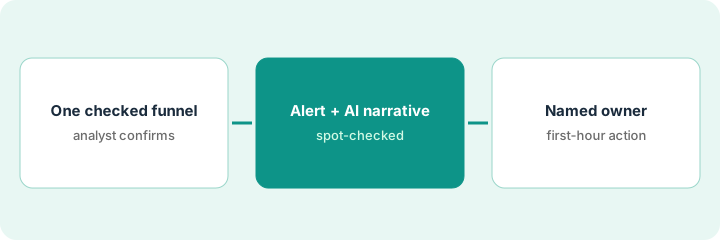
1. Step 1 — Pick one funnel an analyst has checked
What it is: One funnel that matters to an ops decision, with steps built from events your team already trusts. Before anything alerts on it, an analyst (or whoever owns your tracking) confirms the steps and the definition. An alert on a broken funnel just tells you about the tracking.
- Pick one funnel tied to a decision someone makes, such as signup to activation, trial to paid, or invite sent to invite accepted.
- Ask the analyst to confirm each step's event and the conversion window.
- Write down the current conversion rate and the date range you read it on. That's your normal.
- If two teams define the funnel differently, settle that first. The review's point stands: taxonomy quality matters more than any AI feature.
She picks signup to "first project created" within seven days, because a drop there shows up in pipeline a month later. The analyst confirms both events and notes that signups from one partner integration skip a step, so those are filtered out.
Write one line for the funnel before you set anything up: "Funnel: ___ to ___ within ___ days. Events checked by ___ on [date]. Normal rate: ___ over [date range]."
2. Step 2 — Set the alert and let AI draft the narrative
What it is: One alert on that funnel's conversion, plus an AI-drafted narrative for the person who'll read it. Per the review, Amplitude AI can draft "what changed" narratives for people who don't live in charts. The review also notes alert packaging varies, so use whichever alert option your plan includes and confirm its name in your workspace.
- Decide the threshold style before the number: relative (a drop compared with normal) or absolute (below a set rate). Pick a level the owner agrees is worth a message.
- Send the alert to the owner directly, not to a busy shared channel.
- When it fires, ask Amplitude AI what changed in the funnel and let it draft a short narrative.
- The analyst spot-checks the property split behind the narrative before it goes to anyone else. No causal story ships without that check.
The alert fires on a Wednesday: conversion is well below normal. The AI draft says the drop is concentrated in mobile signups. The analyst checks the split, confirms the mobile drop, and adds that a new signup form went live on mobile that Monday. The narrative that reaches the owner says "mobile drop, coincides with the new form, cause not yet confirmed."
When the alert fires for the first time, save the AI's draft narrative and the analyst's checked version side by side. Mark every sentence in the draft "checked," "changed," or "removed."
3. Step 3 — Name the owner and write what they do when it fires
What it is: One person who acts, and a short written action. The review's rule is the one to keep: an alert without an owner gets dropped. Writing the action down stops the alert from becoming another message people read and ignore.
- Name the owner: a person, not a team.
- Write what they do in the first hour: who they ask, what they check, and who they tell.
- Write what counts as "resolved," so the alert doesn't stay open forever.
- After four weeks, look at how often it fired and what the owner did each time. Change the threshold or retire the alert if it never led to an action.
Owner: the revenue operations lead. First hour: ask the analyst for the checked narrative, check the release notes for that day, and tell the growth lead if a release lines up. Resolved: conversion back within normal range for three days, or a fix ticket filed. After four weeks it fired twice, and both times led to a ticket, so she keeps it and adds a second funnel.
List up to four alerts you might add. For each, write the metric, the threshold style (relative or absolute; no invented numbers), the owner, and the first-hour action. Drop any alert you can't name an owner for.
Pricing context (October 2026)
This how-to isn't a price sheet. The Amplitude AI review doesn't quote prices and says AI Agents packaging and limits can vary by plan. Amplitude's own pricing page publishes a Free plan and a Plus plan that starts with free event volume, with Growth and Enterprise by quote. The pricing check below has the details. Dated October 2026.
Checked Oct 13, 2026 on the vendor’s own pricing page: Amplitude’s pricing page lists a Free plan (2 million events a month, no credit card) and a Plus plan that “Starts at $0” with the first 2 million events a month free and a card required. Plus lists Alerts and “AI Agents and MCP”; Growth adds “Monitoring and Alerts” and Enterprise “Unlimited Monitoring and Alerts.” Growth and Enterprise are custom, event-based pricing through sales. The page’s plan table shows forecasting and alerts as not included on Free and limited on Plus.
Uncertainty: Which plan includes which alert type, and which AI surfaces you can use, can change. Confirm in your workspace and with your admin before budgeting. If your contract and our review disagree, trust your contract. The only prices this site sells here are the optional $9 AI toolkit spreadsheet and $19 AI toolkit audit.
When this helps (honest take)
Useful when product events already live in Amplitude, an analyst can check the funnel once, and one person will actually act on a drop. One owned alert beats twenty unowned ones, and the AI narrative saves the owner from reading charts they don't use every day.
Not useful when the taxonomy is messy (the alert will mostly report tracking problems), nobody can own the response, or your events live in another tool. AI narratives don't fix dirty data, and they don't explain causes on their own.
Related options (educational)
| Need | Where to look | Why |
|---|---|---|
| Amplitude AI features | Amplitude AI | Primary path on this page |
| Events already in Mixpanel | Mixpanel AI | Same routine, different home |
| Events already in PostHog | PostHog AI | AI credits with a billing limit you can set |
| Dashboard narratives in BI | Looker Studio + Gemini | Report text, not product events |
| A weekly metrics pull with an owner | Hex weekly metrics notebook | Live how-to |
| Analytics and ops AI seats in one view | Stack map for product ops | Spot overlapping seats |
FAQ
Can Amplitude's AI tell me why conversion dropped?
It can draft a narrative of what changed, and per our review that's a starting point. An analyst checks the property split before anyone states a cause.
Why only one alert to start?
Because unowned alerts get ignored. One alert with a named owner and a written first-hour action shows you whether alerts change anything before you add more.
Where do current prices live?
On Amplitude's pricing page, which publishes the Free and Plus plans and routes Growth and Enterprise to sales. This page doesn't invent figures beyond what that page shows. Our Oct 13, 2026 check of the vendor’s own pricing page is summarized in the pricing section above.
Which Amplitude plan includes alerts?
Amplitude’s pricing page lists Alerts on Plus and “Monitoring and Alerts” on Growth and Enterprise, and shows forecasting and alerts as not included on Free. Confirm in your workspace before you plan around it.
Optional next step
Free reviews stay free. If ops pays for a product analytics tool, a BI tool, and a chat assistant that all answer the same funnel questions, the $9 AI toolkit spreadsheet helps you lay them out, or the $19 AI toolkit audit gets you a written memo.