How-to · Support · Salesforce Service Cloud · Oct 19, 2026
Let Agentforce for Service draft case replies in Service Cloud, and have the agent confirm every one before it sends
Agentforce for Service can draft replies, summaries, and related case assists inside Service Cloud. A fluent draft can still be wrong about entitlement or order status. This page shows how to pilot drafts with an agent confirm on every send. Terms: QA means a quality check done by a person.
Who this is for
Enterprise customer-ops leads whose cases already live in Salesforce Service Cloud. The job here is agent confirmation on case drafts. Zendesk macro QA is a related pattern on a different desk.
How to do it
This is a how-to, not a ranking of CRM service suites. Per the Salesforce Service Cloud AI review, Agentforce for Service covers generative replies, summaries, answers, and knowledge articles, with case classification, routing, and wrap-up on the same public table. The ground rule: no draft sends until an agent confirms it against the case and systems of record.

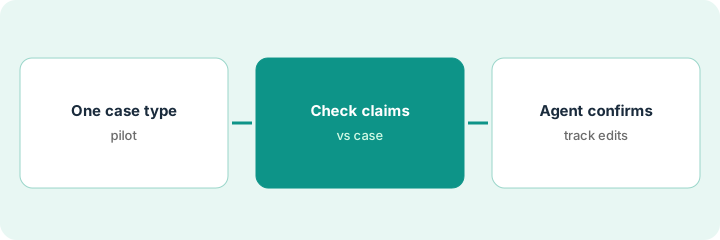
1. Pick one case type for the pilot
What it is: Choose one high-volume, low-risk case type for drafts, and write three jobs that stay agent-owned (refunds, legal commitments, identity changes).
- Name the case type and the pilot owner.
- List three safe draft jobs and three agent-owned jobs.
- Confirm Agentforce for Service is on for those users in your org.
- Do not pretend routing or classification is on if setup says Off.
- Keep the pilot to one queue for a week.
Ops picks “Where is my order?” as the pilot. Refunds and address changes stay agent-owned. Ten agents get drafts enabled.
Write the safe vs agent-owned lists before anyone turns drafts on.
2. Read the draft against case history
What it is: When a draft appears, the agent checks every factual claim against Salesforce fields and any linked order system before editing.
- Mark each claim In Salesforce, Unknown, or Delete.
- Delete claims the model cannot see in the case.
- Keep tone edits separate from fact edits.
- Do not send from the draft panel in one click on day one.
- Sample classification predictions separately if that feature is on.
The draft says the replacement shipped. The fulfillment field is blank. The agent deletes that sentence and checks the order system.
List every factual claim in the draft and mark each against the case before you edit.
3. Agent confirms or edits; track edit rate for a week
What it is: The agent sends only after confirm/edit, and the team counts how often drafts needed fact edits for seven days.
- Require confirm before send.
- Log fact-edit vs tone-only edit.
- If fact-edit rate stays high, narrow the case type or turn drafts off.
- Share the weekly rate with the pilot owner.
- Expand only after a written go decision.
Forty percent of drafts needed a fact edit on day three. Ops keeps the pilot on order-status only and adds a checklist for shipping claims.
Count fact edits for a week before you widen the pilot.
Pricing context (October 2026)
This how-to isn’t a price sheet. Per the Salesforce Service Cloud AI review and Salesforce’s customer service AI pricing page (checked Oct 19, 2026), Agentforce for Service is listed at $125 USD per user per month, billed annually. The page is informational and subject to change. Dated October 2026.
Checked Oct 19, 2026 on the vendor’s own pricing page: Salesforce’s customer service AI pricing page lists Agentforce for Service at $125 USD per user per month, billed annually. The page is informational and subject to change.
Uncertainty: The only prices this site sells here are the optional $9 AI toolkit spreadsheet and $19 AI toolkit audit.
When this helps (honest take)
Useful when cases already live in Service Cloud and agents will confirm every draft.
Not useful when you wanted the model to issue refunds, or the desk is not Salesforce.
Related options (educational)
| Need | Where to look | Why |
|---|---|---|
| Salesforce Service Cloud AI | Salesforce Service Cloud AI | Primary path |
| Zendesk macro QA | Zendesk macro QA sample | Related desk QA pattern |
| Support stack map | Stack map: support ops | Where Service Cloud fits |
FAQ
Is Einstein the product name?
Use Agentforce for Service as on Salesforce’s public customer-service AI pricing page. Older Einstein labels may still appear in your org — verify what is enabled.
How much is Agentforce for Service?
Salesforce lists $125 USD per user per month, billed annually, on the customer service AI pricing page (checked Oct 19, 2026). Confirm your edition and contract.
Optional next step
If you want a one-page toolkit map for the tools you already pay for, use the optional $9 AI toolkit spreadsheet. If you want a short review of seat waste and unused tools, use the optional $19 AI toolkit audit. Neither is required to follow this how-to.