How-to · Clinical notes · AdvancedMD · Oct 21, 2026
Pick one of AdvancedMD’s five AI note formats for a week, and have the provider sign every note and suggested order
AdvancedMD’s AI Clinical Assistant listens to the visit and drafts the note in one of five formats, prepares pre-visit summaries, and suggests chart items and orders. Its AI insurance card capture fills coverage fields at intake. This page shows how to try one note format for one week while the provider reads and signs every note and every suggested order, and the front desk checks every card the AI reads.
Who this is for
Office managers, practice administrators, physician owners, and billing leads at independent practices on AdvancedMD, or weighing it. The job here is a one-week, one-format trial of ambient notes with the provider signing everything, plus a check on AI insurance card capture. This is an operations how-to, not medical, coding, or billing advice. For checking athenahealth’s Express Coding on ambient visits — a different job on a different EHR — see athenahealth Express Coding biller review.
How to do it
This is a how-to, not a ranking of practice software. Per the AdvancedMD AI review, the AI Clinical Assistant records the visit (the clinician can record, pause, or stop), drafts the transcript into one of five formats — Shareable Visit Summary, SOAP, Psychiatric Evaluation, Medication Management, or Treatment Plan — and each document can be regenerated once before the clinician reviews, edits, and signs. AdvancedMD says providers “review, edit and approve all content before signing.” Its 2026 Fall Release (6 October 2026) adds order suggestions. The review notes AdvancedMD’s AI page is not consistent about telehealth and mobile availability, so ask which applies to your account. The ground rule: the provider who saw the patient signs every note and every suggested order; nothing the assistant drafts is part of the chart until that provider signs it.

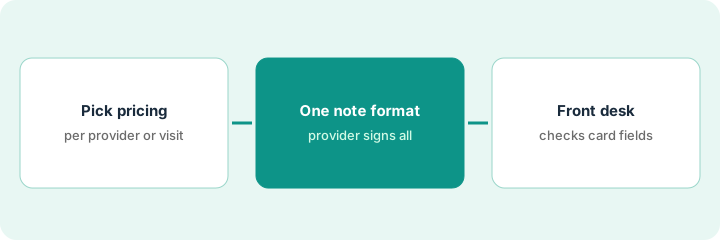
1. Choose per-provider or per-encounter pricing from your visit counts
What it is: AdvancedMD sells its AI tools (the AI Clinical Assistant and AI insurance card capture) as one add-on with two pricing models. Pick the model provider by provider from last month’s visits, not from a sales estimate.
- Export last month’s visits per provider.
- Per AdvancedMD’s pricing page, the AI add-on is $100 per provider per month for unlimited encounters, or $0.99 per encounter.
- At those two prices the flat fee costs less once a provider has more than about 101 AI encounters a month.
- Put high-volume providers on the flat fee and low-volume providers on per-encounter pricing.
- Write the choice next to each provider’s name and recheck at renewal.
The office manager exports last month’s visits. Two full-time physicians had about 300 visits each; three part-time therapists had about 50 each. She puts the physicians on the flat fee and the therapists on per-encounter pricing, and notes the date to recheck counts in three months.
Export last month’s visits per provider, mark each provider above or below about 101 AI encounters a month, and choose flat or per-encounter pricing for each before signing the add-on.
2. Run one note format for a week; the provider signs every note and suggested order
What it is: Pick one of the five formats for one visit type and run it for a week. The provider who saw the patient reads every draft, every suggested action item, and every suggested order, and signs only what matches the visit.
- Pick one format that fits one visit type, for example SOAP for routine follow-ups.
- Name the providers in the trial and the office manager as the trial owner.
- Have each provider keep a short list of every correction before signing: wrong medication, wrong speaker, missing safety-plan item.
- Accept suggested chart items and orders one at a time, never in bulk.
- Record how often a draft needed its one regeneration.
Three providers use the SOAP format for follow-up visits for one week. Most drafts need light edits. Two suggested imaging orders are for the wrong side and one suggested lab panel is out of date; each provider catches them before signing. The medical director keeps the format on and adds a side check to the imaging order template.
Pick one note format and one visit type, name the signing providers, and have each provider list every correction to notes and suggested orders for one week before anyone widens the trial.
3. Have the front desk check every AI-read insurance card
What it is: AI insurance card capture fills the effective start date, carrier, subscriber, subscriber ID, group name, and group number, and new patient uploads land on the Insurance Card Worklist for staff to approve or deny coverage. AdvancedMD’s own FAQ recommends verifying that fields map correctly.
- Have the front desk lead compare the first thirty AI-read cards with the card images on the worklist.
- Check carrier name, subscriber, and subscriber ID first.
- Check the back of the card for group numbers.
- Log every wrong field before approving coverage in bulk.
- Keep a weekly sample after the first thirty.
The front desk lead checks thirty cards. Twenty-six are right. Two picked the wrong carrier from similar names, one put a parent’s ID on the child as subscriber, and one missed a group number on the back. She adds “check carrier and subscriber” to the worklist routine.
Compare the first thirty AI-read insurance cards with their images on the worklist and log every wrong carrier, subscriber, or ID before approving coverage without a check.
Pricing context (October 2026)
This how-to isn’t a price sheet. Per the AdvancedMD AI review, AdvancedMD publishes price ranges for its core software by specialty and a separate price for the AI tools add-on. We rechecked the AI add-on price on AdvancedMD’s own pricing page on Oct 21, 2026 (below). The page title also advertises a three-months-free offer whose terms the page does not state, so ask in writing. Core software prices depend on specialty, bundle, and provider count; see the review. Dated October 2026.
Checked Oct 21, 2026 on the vendor’s own site: AdvancedMD’s software pricing page says AI tools (the AI Clinical Assistant and AI insurance card capture) “are bundled and available for $100/month per provider for unlimited encounters, or $0.99 per encounter.” Core practice management and EHR subscriptions are priced separately by specialty; see our review. The page title advertises a three-months-free offer whose terms it does not state.
Uncertainty: The only prices this site sells here are the optional $9 AI toolkit spreadsheet and $19 AI toolkit audit.
When this helps (honest take)
Useful when you are an independent practice that wants practice management, EHR, and ambient notes from one vendor with published prices, and the office manager will own the trial and the provider will sign every draft.
Not useful when you are a health system on Epic or Oracle Health, nobody will collect corrections during the trial, or providers expect to accept suggested orders in bulk.
Related options (educational)
| Need | Where to look | Why |
|---|---|---|
| Ambient notes, suggested orders, and card capture | AdvancedMD AI | Primary path; published AI add-on price |
| Ambient visits plus biller code review on athenaOne | athenahealth Express Coding biller review | A different job |
| Ambulatory EHR with Sunoh and Image AI | eClinicalWorks AI | Different EHR |
| Where clinical notes fit | Stack map: healthcare ops | Broader map |
FAQ
Which five note formats does AdvancedMD offer?
Per our review: Shareable Visit Summary, SOAP, Psychiatric Evaluation, Medication Management, and Treatment Plan. Each document can be regenerated once before the clinician reviews, edits, and signs.
Can AdvancedMD place suggested orders on its own?
Do not set it up that way. AdvancedMD says providers review, edit, and approve all content before signing. The provider who saw the patient signs each suggested order or rejects it.
Does ambient listening work on telehealth and mobile?
Our review found AdvancedMD’s AI page inconsistent on this. Ask AdvancedMD which applies to your account before planning a telehealth trial.
How much does AdvancedMD’s AI cost?
AdvancedMD’s pricing page says the AI tools add-on is $100 per provider per month for unlimited encounters, or $0.99 per encounter (checked Oct 21, 2026). Core software is priced separately by specialty.
Optional next step
If you want a one-page toolkit map for the tools you already pay for, use the optional $9 AI toolkit spreadsheet. If you want a short review of seat waste and unused tools, use the optional $19 AI toolkit audit. Neither is required to follow this how-to.