Feature how-to · Perplexity · Ops research
Perplexity Pages how-to (Sep 2026): sourced briefings for ops research
Feature how-to — Pages for shareable sourced briefs ops can hand stakeholders. Companion to the Perplexity review. Honest note on Create Page status (Sep 2026) and when a Claude Project still wins for private files.
What Perplexity Pages are
Perplexity Pages turn a research thread into a structured, citation-backed article you can share by URL. For ops, that means a vendor or policy briefing stakeholders can reopen — with named public sources — instead of scrolling a private chat. Full product context: Perplexity review. For internal-file research compare Claude for ops and Claude vs ChatGPT for ops.
Sep 2026 availability note (important)
Perplexity’s public help center (checked September 2026) says Create Page is temporarily retired while they enhance the Pages experience, and Convert to Page is expected to return with enhanced capabilities. UI labels and plan gates move. Treat this how-to as the job design for a shareable sourced brief — confirm the live control in your account before promising a Page URL in a stakeholder deadline. Research mode + export (PDF/DOCX/Markdown when offered) can cover the same ops job while Create/Convert is in flux.
How to design a sourced ops brief
Examples at a glance: each step has a concrete ops example plus a short Try this.
1. Vendor security questionnaire brief
What it is: Use Pages (or Convert to Page when available) to turn public-source research on Vendor X into a short brief: what their public docs say about security controls, with citations. Never invent SOC reports or paste private questionnaire answers into a public Page.
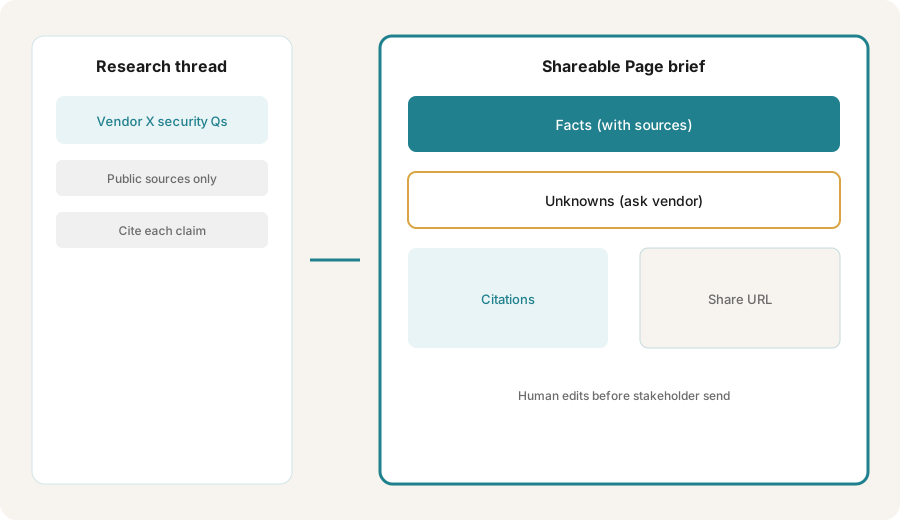
Primary SoT workflow:
Create a Page brief: Vendor X security questionnaire help — cite public sources only; separate facts vs unknowns.
2. Facts vs unknowns
What it is: Every claim that sounds like a fact needs a named public source. Everything else goes in an Unknowns section for the vendor or counsel — do not fill gaps with model guesses.
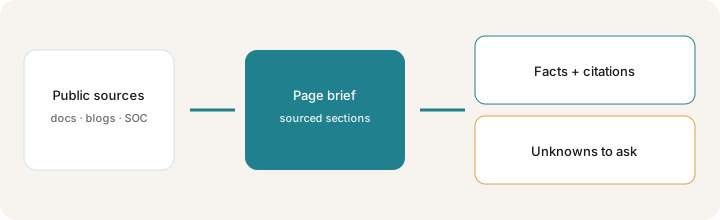
When structuring the brief:
Output two sections only: (1) Facts — each bullet must include a public URL and a “last checked” date; (2) Unknowns — questions to ask Vendor X because no public source was found. Do not invent certifications, subprocessors, or retention periods.
4. Vs plain chat / Claude Project
What it is: Plain Perplexity chat wins for quick cited Q&A. Pages win when you need a reusable shareable brief. Claude Projects / Claude for ops win when the source of truth is private policy PDFs or Sheets — not the public web. Claude vs ChatGPT for ops covers chat-seat tradeoffs.
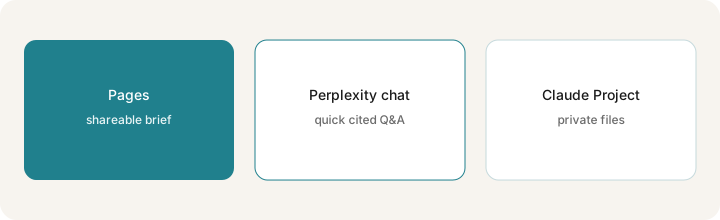
Before picking a home for the brief:
List three research jobs this week. Mark each Public web (Pages/chat) / Private files (Claude or ChatGPT Project). Only use Pages for Public web jobs you will share by URL.
Pricing context (September 2026)
Pages are a Perplexity product feature, not a separate SKU. Perplexity's own pricing page (checked October 25, 2026) lists Pro at US$17/month billed annually (about $204/year) and Max at US$167/month billed annually; monthly billing (often cited at $20/month for Pro) isn't printed there. Enterprise tiers cost more. Confirm on perplexity.ai/hub/pricing and Perplexity Pages help. Create/Convert availability and research limits vary by plan and can change without notice on this page.
Uncertainty: Create Page retirement and Convert to Page return timing are product decisions — recheck the live help center before building a weekly ops ritual on Pages alone. Do not budget from this page alone.
When Pages are useful (honest take)
Useful when ops needs a shareable sourced briefing from public web research and someone will edit before stakeholder send. Less useful when Create/Convert is unavailable in your account, when the truth lives in private files, or when you need a durable export into Notion/Confluence as the system of record. Prefer Research + human-edited doc if Pages controls are missing; prefer Claude/ChatGPT Projects for internal policy packs.
Paying for Perplexity Pages and a few other AI tools? The $9 AI toolkit spreadsheet lists every AI subscription you have, what each one costs, and how fast it pays for itself, so you can see which ones are worth the money.
Want someone to do it for you? AI toolkit audit — $19
Related options (educational)
| Need | Better home | Why |
|---|---|---|
| Shareable cited brief (public web) | Perplexity Pages (when available) | Structured article + citations + share URL |
| Quick cited Q&A | Perplexity chat | Fast answers without publishing a Page |
| Private policy / Sheet truth | Claude Projects / ChatGPT Project | Files stay scoped; not public web |
| Ops chat seat compare | Claude vs ChatGPT for ops | Which primary chat seat fits your files |
| Durable wiki home | Notion / Confluence + human edit | System of record owned by the company |
FAQ
What are Perplexity Pages?
A way to turn research into a structured, citation-backed article you can share by URL — useful for ops briefings when stakeholders need named public sources.
Can I create a new Perplexity Page in September 2026?
Public help (Sep 2026) says Create Page is temporarily retired; Convert to Page is expected to return. Confirm in your live account.
When should ops use Pages instead of a plain Perplexity chat?
Use Pages for a reusable shareable brief. Use chat for one-off cited Q&A. Use Claude/ChatGPT Projects for private files.
Where is the full Perplexity product review?
See /reviews/perplexity.html. This page is the Pages feature how-to.
Optional next step (if seats overlap)
If Perplexity Pages are one piece of a messy multi-seat research stack, optional help: $19 AI toolkit audit or $9 AI toolkit spreadsheet — only if overlapping seats are the real problem. Email Audit $19 or Toolkit spreadsheet $9.
Checkout is live via Stripe. After you pay, we email delivery (spreadsheet) or intake next steps (audit).