Role · Procurement · ChatGPT · Oct 2026
ChatGPT for procurement (Oct 2026): RFP drafts, vendor comparisons, and intake summaries
Procurement work is full of documents: quotes, RFPs, order forms, intake requests. ChatGPT is useful for turning them into comparison tables and first drafts — as long as it never fills a gap with an invented price or term. This page shows four jobs with a Try this for each, and flags a change you need to plan for: OpenAI says it plans to retire custom GPTs and move them to Plugins.
What this page covers
This page is for the procurement manager, buyer, or finance person who handles vendor quotes and purchase requests and has (or is considering) a ChatGPT Business workspace. It covers drafting and comparison work — not approvals, routing, or payments, which belong in your procurement system.
Important change: OpenAI’s help center (read 5 October 2026) says it is planning to retire custom GPTs and recommends moving workflows to Plugins, which bring reusable instructions and connected apps together. For affected Enterprise workspaces, retirement is planned for 11 December 2026; a migration flow was targeted for 17 September 2026; other plans are expected to follow the same timeline. New GPT creation is already unavailable on personal plans (Free, Go, Plus, Pro); Business, Enterprise, and Edu workspaces can still create GPTs. So the primary Try this below uses a custom GPT, with a Project-based alternative that won’t be affected.
Facts come from OpenAI’s help center articles on ChatGPT Business, creating and editing GPTs, and Projects, read on 5 October 2026.
Major features (with how someone uses them)
Examples at a glance: each feature has a concrete example from a real job plus a short Try this you can run this week.
1. A Vendor compare GPT that never invents a price (primary)
What it is: A custom GPT is a saved assistant with instructions and up to 20 knowledge files (512 MB each). For vendor comparisons, the instruction that matters most is what to do with gaps: if a quote doesn’t state a price, term, or SLA, the table should say “not stated,” not guess. Paste quotes with your company details and anything confidential removed.
Because custom GPTs are being retired, keep a copy of the instructions in a document. The same instructions work in a Project (chats, files, and instructions together), which isn’t affected by the GPT retirement.
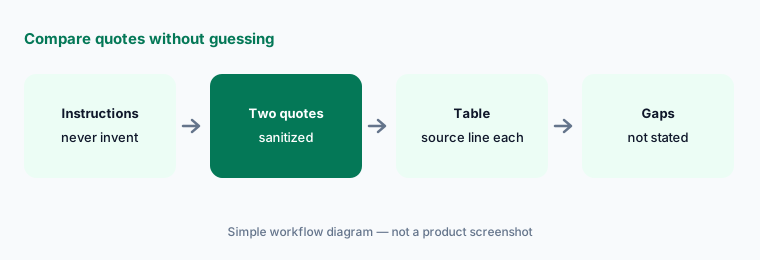
Primary workflow:
Create a custom GPT called Vendor compare. Instructions: never invent a price or term. Paste two sanitized quotes. (No GPT builder, or planning ahead for the retirement? Put the same instructions in a Project called Vendor compare.)
2. RFP outlines from your requirements
What it is: Give ChatGPT a list of requirements and constraints (users, integrations, security needs, timeline) and ask for an RFP outline with sections and questions. It’s good at structure and completeness checks — “you didn’t ask about data residency” — and the output is a draft your team edits.
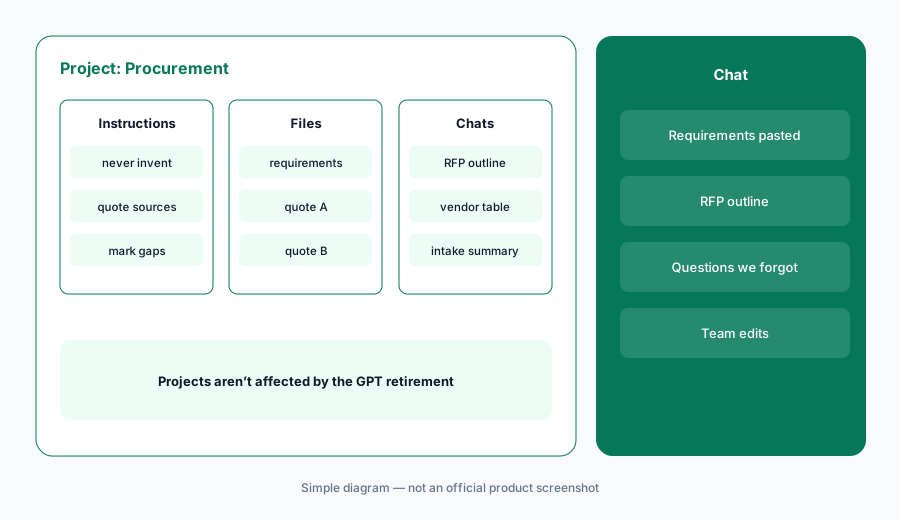
Ask for gaps:
Paste your requirements and ask for an RFP outline plus a list of “questions we forgot to ask.” Keep only the questions your team agrees matter.
3. Summarize a messy intake request
What it is: Purchase requests arrive as long emails or Slack threads. ChatGPT can turn one into a structured summary: what’s being bought, for whom, estimated cost if stated, data involved, and open questions. If you use a procurement system like Zip or Coupa, its own intake AI may already do this inside the workflow — use ChatGPT only where that doesn’t exist.
Structured summary:
Paste one sanitized request thread. Ask for: item, requester, cost if stated, data involved, open questions. Compare it with what your intake form would have captured.
4. What stays with people and systems
What it is: OpenAI says it doesn’t train on ChatGPT Business workspace data. Even so, approvals, negotiation, and payments stay with people and your procurement system. ChatGPT drafts and compares; it doesn’t route approvals or know your negotiated rates unless you paste them.
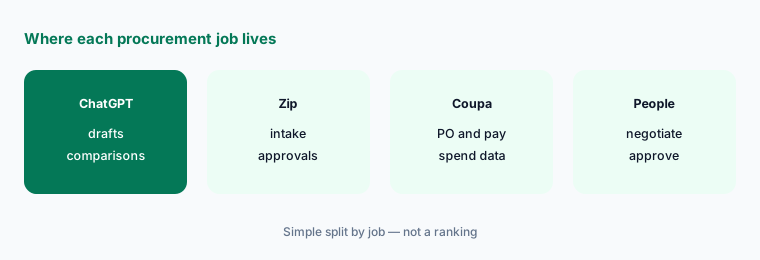
One rule:
Write one rule for your team: nothing ChatGPT drafts goes to a vendor without a person rereading every number against the source quote.
Pricing context (October 2026)
OpenAI’s ChatGPT Business FAQ, read on 5 October 2026: Standard seats $25 per user per month billed monthly or $20 billed annually; Premium seats $125 monthly or $100 annually; a workspace needs at least two paid seats. ChatGPT Team was renamed ChatGPT Business on 29 August 2025. OpenAI says it doesn’t train on Business workspace data. (The chatgpt.com pricing page blocked our automated check, so these figures are from OpenAI’s help center.)
Uncertainty: Prices can vary by country and currency. The custom GPT retirement timeline for Business workspaces hasn’t been given a specific date beyond “expected to follow” Enterprise — watch your workspace notices. Check OpenAI’s live pages before you budget or build new GPTs.
When it’s useful (honest take)
Useful when you compare quotes, draft RFPs, or summarize requests often, and your team will reread every number against the source.
Less useful when your procurement system’s own AI already drafts intake, or when you’d paste confidential pricing that policy says must stay in approved systems.
Paying for ChatGPT and a few other AI tools? The $9 AI toolkit spreadsheet lists every AI subscription you have, what each one costs, and how fast it pays for itself, so you can see which ones are worth the money.
Want someone to do it for you? AI toolkit audit — $19
Related options (educational)
| Need | Better home | Why |
|---|---|---|
| Quote comparisons and RFP drafts | ChatGPT for procurement (this page) | Drafts from sanitized text |
| Custom GPT setup (and its retirement) | ChatGPT custom GPTs | Instructions and knowledge files |
| Intake drafting inside the workflow | Zip AI | AI intake plus approvals |
| Spend questions in the suite | Coupa Navi | Agents on Coupa data |
| Same jobs in Claude | Claude for ops | Projects for reusable instructions |
FAQ
Are custom GPTs being retired?
OpenAI’s help center says it plans to retire custom GPTs and recommends moving to Plugins. For affected Enterprise workspaces, retirement is planned for 11 December 2026, and other plans are expected to follow.
Can I still create a custom GPT?
On 5 October 2026, OpenAI said Business, Enterprise, and Edu workspaces can create GPTs, but personal accounts (Free, Go, Plus, Pro) can’t create new ones.
How much does ChatGPT Business cost in October 2026?
OpenAI’s FAQ listed Standard seats at $25 per user per month billed monthly or $20 annually, and Premium at $125 monthly or $100 annually, with a two-seat minimum.
Will ChatGPT invent prices in a vendor comparison?
It can if the quote is silent. Instruct it to write “not stated” for missing terms and to quote the source line for every number, then check each number yourself.
Does OpenAI train on ChatGPT Business data?
OpenAI says it does not train on ChatGPT Business workspace data.
Optional next step (if seats overlap)
If procurement pays for an intake tool, a spend suite, and chat seats that all draft the same comparisons, that overlap is worth mapping. Map the overlap with the $19 AI toolkit audit or the $9 AI toolkit spreadsheet.
Both pages explain what you get and how delivery works before you decide.