Tool · Ops & automation · Basecamp · Oct 2026
Basecamp AI review (Oct 2026): assists for small ops teams already on Basecamp
Basecamp AI for small ops on to-dos, messages, and docs — status and action drafts with a human approve gate before client-facing send. Complements Asana Intelligence, monday.com AI, and Notion AI.
What Basecamp AI covers here
This page is for small ops teams already on Basecamp who want AI help drafting status updates and to-dos from real project threads — with a human approve gate before anything client-facing goes out. We focus on thread → draft → approve, message tone, doc outlines, and when Asana, monday, or Notion AI is the better home. Feature names and packaging change — verify live on Basecamp’s site.
Major features (with how someone uses them)
Examples at a glance: each feature has a concrete ops example plus a short Try this.
1. Status + to-do drafts from threads (primary)
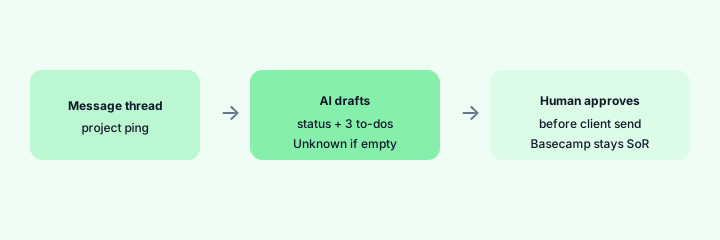
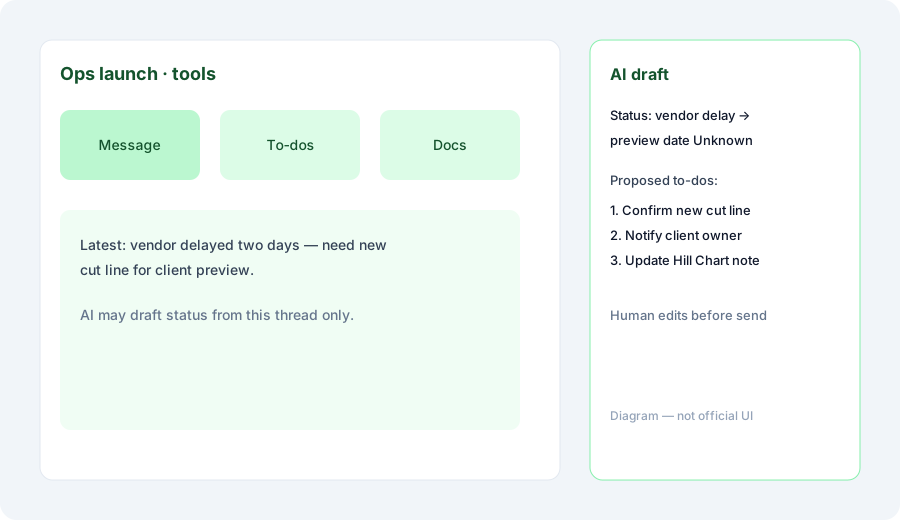
What it is: Use AI to propose a status update and a short to-do list from an existing message thread. Basecamp remains the project home — AI does not invent dates or owners missing from the thread.
Primary SoT workflow:
From a project message thread: draft a status update and 3 to-dos a human approves.
2. Message and announcement drafts
What it is: Draft internal announcements or client-facing notes from bullet facts you provide. Prefer short, plain language. Never invent commitments.
Announcement honesty:
Using only 5 fact bullets: draft a Basecamp Message Board post. Mark Unknown for any missing date, owner, or commitment. No invented SLAs.
3. Doc outlines from project notes
What it is: Turn scattered notes into a Docs & Files outline (sections + open questions). Useful before a kickoff or handoff. Human owns final publish.
Outline gate:
Paste a messy kickoff note. Propose a Docs outline with section titles and an Open questions list. Do not invent scope the note never stated.
4. Vs Asana / monday / Notion AI
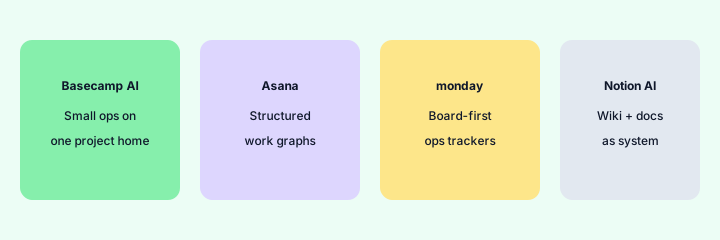
What it is: Stay in the home you already pay for. Basecamp AI for small ops on Basecamp; Asana Intelligence for structured work graphs; monday.com AI for board-first trackers; Notion AI when docs/wiki are the SoR. Soft $19/$9 below only if seats overlap on the same status jobs.
Home-for-the-job:
List 6 recurring project/ops jobs this quarter. Assign each to Basecamp AI, Asana Intelligence, monday.com AI, or Notion AI — one sentence why. Do not invent a home you do not use.
Pricing context (October 2026)
Basecamp (37signals) publishes plans on its public site (start from basecamp.com/pricing). This page is dated October 2026 and is not a price sheet — we do not invent exact per-seat or AI add-on prices. AI packaging may be included, add-on, or limited by plan — verify live.
Uncertainty: Which surfaces exist, how they are branded, and which plans include them change. Always verify on live Basecamp pages before budgeting.
When Basecamp AI is useful (honest take)
Useful when Basecamp is already the project home for a small ops team, threads contain real facts, and humans approve before client send. Less useful when the team’s real tracker is Asana/Jira and Basecamp is only chat, or when you hoped AI alone would invent dates and owners from empty projects.
Paying for Basecamp AI and a few other AI tools? The $9 AI toolkit spreadsheet lists every AI subscription you have, what each one costs, and how fast it pays for itself, so you can see which ones are worth the money.
Want someone to do it for you? AI toolkit audit — $19
Related options (educational)
| Need | Better home | Why |
|---|---|---|
| Basecamp already SoR | Basecamp AI (this page) | Status + to-dos with human approve |
| Structured work graphs | Asana Intelligence | Dependencies, portfolios, team SoR |
| Board-first ops trackers | monday.com AI | Dashboards and board views |
| Wiki / docs as system | Notion AI | When pages are the SoR |
| Light boards | Trello AI | Checklist templates, stale cards |
FAQ
What is Basecamp AI?
Assists inside Basecamp for status, to-do, and doc drafts a human should edit. Verify live feature names on Basecamp’s site.
How much does it cost?
Confirm on Basecamp’s public pricing — this Oct 2026 page does not invent exact prices.
Should AI invent client dates or owners?
No. Drafts only. Mark Unknown when the thread is blank. Human approves before client send.
Basecamp vs Asana / monday / Notion?
Stay in the home you already pay for. See related reviews linked above.
Optional next step (if seats overlap)
If several AI seats would cover the same task and work-management jobs, optional help mapping overlap: $19 AI toolkit audit or $9 AI toolkit spreadsheet. Email Audit $19 or Toolkit spreadsheet $9.
Checkout is live via Stripe. After you pay, we email delivery (spreadsheet) or intake next steps (audit).