How-to · Insurance agencies · Zywave · Oct 20, 2026
Use Zywave’s Producer Agent to prep renewal outreach, and have the producer approve every outbound message
Zywave Apex puts a Producer Agent, an early access Advisor Agent, and an MCP connection to Claude, ChatGPT, Copilot, or Gemini in front of agency producers. Emails still go out under a licensed producer’s name. This page shows how to start narrow and keep every outbound message behind the producer’s approval.
Who this is for
Agency principals, sales leaders, producers, and account executives at independent agencies that use Zywave data or quoting tools and want AI help with outreach without sending anything unread. The job here is outbound approval: access controls first, then producer sign-off on every message and account executive sign-off on any renewal call list.
How to do it
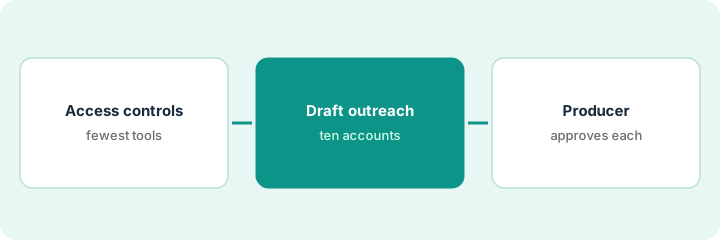
This is a how-to, not a ranking of sales tools. Per the Zywave AI review, Producer Agent and the Apex MCP server are labelled Live, Advisor Agent is labelled Early Access (its agent page lists Agency Matrix and Partner Platform as supported agency systems), and Zywave says the producer approves a sequence before it sends from the producer’s own Outlook. The ground rule: fewest tools for fewest people, and nothing sends unread.
1. Set access controls before anyone connects an assistant
What it is: Zywave says Apex access mirrors each user’s Zywave licences and admins can restrict tools by role, team, or person. Decide those limits before connecting Claude, ChatGPT, Copilot, or Gemini through the Apex MCP server.
- List which Apex tools each role needs: research and content for producers, record-changing tools for a small group only.
- Have your IT admin approve the organisation-level setup with Zywave’s implementation team.
- Connect two people first, not the whole sales team.
- Read the audit trail weekly for the first month.
- Remind staff that the assistant now acts on the book, so every confirmation gets read.
An operations manager turns on research and content tools for five producers and limits record-changing tools to two account managers for the first month. On Friday she reads the audit trail and finds one large prospect export, and asks why before widening anything.
Write one line per role: which Apex tools it gets on day one. Turn on only those.
2. Have Producer Agent draft outreach for ten renewals or prospects
What it is: Producer Agent writes multi-touch email sequences from Zywave’s Content Cloud articles. Start with ten accounts the producer knows, so wrong facts stand out.
- Check each decision-maker and renewal date against a second source before any draft is used.
- If you are in Advisor Agent’s early access group, treat its ranked renewal list as a suggestion, not the call order.
- Have the account executive check each account on a renewal list against the client file before anyone calls.
- Remove accounts where the data is stale.
- Keep content requests matched to the client’s state and the current year.
A producer asks for outreach to ten restaurant accounts coming up for renewal next quarter. Two decision-makers have left, so she removes them. The account executive checks the early access renewal list against the client file and takes off one client who already re-signed a multi-year deal.
Before any sequence is drafted, check each account’s decision-maker and renewal date against the client file or a second source.
3. Producer approves every outbound message
What it is: Every email goes out under a licensed producer’s name. The producer reads every touch in the sequence and removes anything that sounds like a coverage or price promise before approving.
- Read each email, not just the first.
- Rewrite any sentence that promises coverage, savings, or a specific outcome.
- Have a licensed person review any coverage-gap note before it reaches a client.
- Send yourself a copy of every touch for the first month.
- Treat Zywave’s open-rate and click figures as vendor claims, not your forecast.
In a five-email sequence, one line says the agency can make sure the client is fully covered for food spoilage. The producer rewrites it to offer a review of the current policy, approves the sequence, and copies herself on every touch.
Read every email in the sequence and delete any sentence that promises coverage or price before you click approve.
Pricing context (October 2026)
This how-to isn’t a price sheet. Per the Zywave AI review, Zywave does not publish prices for Apex, Producer Agent, Advisor Agent, or the MCP server. When we checked on Oct 20, 2026, zywave.com/pricing returned not found. Treat it as quote-only; per the review, Advisor Agent early adopters get preferential pricing under an early adopter agreement. Dated October 2026.
Checked Oct 20, 2026 on the vendor’s own site: Zywave publishes no prices for Apex; zywave.com/pricing returned not found and Zywave’s site lists no prices. This page quotes no Zywave dollar figure; ask Zywave for a written quote and see our review for what is known.
Uncertainty: The only prices this site sells here are the optional $9 AI toolkit spreadsheet and $19 AI toolkit audit.
When this helps (honest take)
Useful when your agency already uses Zywave data or quoting tools, producers want help with outreach, and every producer will read their sequences before approving them.
Not useful when you are a carrier looking for underwriting or claims AI, your agency system is not supported for the agent you want, or you want emails to send without a person reading them.
Related options (educational)
| Need | Where to look | Why |
|---|---|---|
| Producer outreach on Zywave Apex | Zywave AI | Primary path; quote only |
| Where agency growth AI fits | Stack map: insurance ops | Broader map |
| AI inside the agency system | Applied Epic AI | Different layer |
| General CRM outreach | HubSpot AI | Outside insurance data |
FAQ
Is Advisor Agent generally available?
No. Per our review, Zywave labels it Early Access, and its agent page lists Agency Matrix and Partner Platform as the supported agency systems.
Does Producer Agent send emails on its own?
Zywave says the producer approves the sequence first, and then emails send from the producer’s own Outlook. Read every email before approving.
How much does Zywave Apex cost?
Zywave does not publish prices. Treat it as quote-only (checked Oct 20, 2026).
Optional next step
If you want a one-page toolkit map for the tools you already pay for, use the optional $9 AI toolkit spreadsheet. If you want a short review of seat waste and unused tools, use the optional $19 AI toolkit audit. Neither is required to follow this how-to.