How-to · Procurement · Zip · Oct 19, 2026
Paste a purchase request into Zip’s AI intake, and have the requester confirm every filled field
Zip’s AI intake can complete a purchase request from pasted text, and Procurement Concierge can sit at the front door. A wrong vendor name or amount still routes if nobody confirms. This page shows how to keep the requester’s confirmation in front of routing. Coupa Navi spend answers are a different job.
Who this is for
Procurement ops teams already on Zip. The job here is requester confirmation of AI-completed intake fields.
How to do it
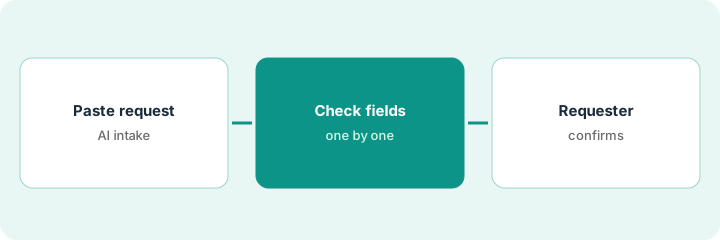
This is a how-to, not a ranking of procurement suites. Per the Zip Procurement AI review, Zip offers AI intake completion from a pasted request, Procurement Concierge, and Superagents with approval controls. The ground rule: no request routes until the requester confirms every AI-filled field.
1. Paste one real request
What it is: Take one real purchase request from email or chat, paste it into Zip’s AI intake, and leave routing off until fields are checked.
- Use a real request, not a synthetic demo.
- Keep Procurement Concierge settings unchanged for this first run if you are only testing intake.
- Note which fields Auto-Fill completed.
- Do not submit to approvers yet.
- Capture a screenshot of the raw paste.
An employee pastes a Slack thread asking for three laptops. Zip fills vendor, quantity, and cost center guesses.
Paste one real request and write “requester confirm still open” on the draft.
2. Check each AI-filled field
What it is: Open every completed field and compare it to the pasted text and your catalog.
- Check vendor, amount, cost center, and need-by date.
- Clear fields Zip invented.
- Flag mismatches for the requester.
- Do not trust Superagents to fix bad intake later.
- Keep a field checklist.
Zip guessed the wrong cost center from an old thread. Quantity matched. Cost center is cleared for the requester to fill.
Tick every AI-filled field against the paste before you ping the requester.
3. Requester confirms; review Superagent approval controls
What it is: The requester confirms or corrects every field, then procurement reviews Superagent approval controls before any autonomous routing expands.
- Requester confirms in writing or in-product.
- Only then route to approvers.
- Open Superagent approval controls and confirm humans still gate money movement.
- Log exceptions for a week.
- Expand Concierge only after intake confirmation holds.
The requester fixes the cost center and confirms quantity. Procurement leaves Superagents on “ask” for vendor creates.
Get requester confirmation before route, then read Superagent approval controls once.
Pricing context (October 2026)
This how-to isn’t a price sheet. Per the Zip Procurement AI review, Zip publishes no public list prices (pricing URL returned not found on Oct 19, 2026). Ask Zip for a quote. Dated October 2026.
Checked Oct 19, 2026 on the vendor’s own pricing page: Zip’s pricing URL returned not found on Oct 19, 2026; Zip publishes no public list prices. This page quotes no Zip dollar figure; confirm what your contract includes with Zip or your admin.
Uncertainty: The only prices this site sells here are the optional $9 AI toolkit spreadsheet and $19 AI toolkit audit.
When this helps (honest take)
Useful when you already intake purchases in Zip and need requester confirmation on AI-filled fields.
Not useful when requesters will not confirm fields, or you wanted unsupervised Superagents creating vendors.
Related options (educational)
| Need | Where to look | Why |
|---|---|---|
| Zip Procurement AI | Zip Procurement AI | Primary path |
| Zip vs Coupa | Zip vs Coupa | Compare procurement AI |
| Coupa Navi spend check | Coupa Navi Analytics Agent spend check | A different job |
FAQ
What is Procurement Concierge?
Per our review it is Zip’s front door for intake. This routine still requires requester field confirmation before routing.
How much does Zip cost?
Zip publishes no public list prices we could verify on Oct 19, 2026. Ask for a quote.
Optional next step
If you want a one-page toolkit map for the tools you already pay for, use the optional $9 AI toolkit spreadsheet. If you want a short review of seat waste and unused tools, use the optional $19 AI toolkit audit. Neither is required to follow this how-to.