How-to · Finance ops · Sage Intacct AI · Oct 12, 2026
List the Sage Intacct dimensions AI may suggest and the ones finance locks
Sage Intacct's dimensions (location, department, project, customer, and whatever else you've set up) are what make its reporting useful, and miscoding them quietly breaks that reporting. This page shows a controller how to decide, in writing, which dimensions AI may suggest and which ones only finance sets, then check a sample each month. Terms: ERP means enterprise resource planning, the core finance and operations system.
Who this is for
Controllers and finance managers at mid-market companies running Sage Intacct who are turning on AI assists, or whose accounts payable or ops teams use a general AI assistant to help code transactions before entry. If you're still choosing an ERP, see the comparison notes on the Sage Intacct AI review.
How to do it
This is a how-to, not a ranking of ERPs. Feature detail lives on the Sage Intacct AI review. Which AI assists you have depends on your Intacct release and contract, so check with your admin first. The rule on this page works either way.
1. Step 1 — List every dimension you actually code to
What it is: A one-page list of the dimensions in use, who relies on each one, and what goes wrong if it's coded badly.
- Export your dimension list from Intacct. Include standard dimensions and any user-defined ones.
- Remove dimensions nobody has coded to in the last six months.
- For each remaining one, write who reads reports built on it (board, department heads, grant reporting, project billing).
- Note which dimensions feed customer invoices, revenue recognition, or anything external. Those carry the most risk.
The export shows 11 dimensions. Three haven't been used since last year. Of the remaining eight, Grant and Entity feed funder reports and audited statements; Department and Location feed internal budget reviews.
Make a sheet: Dimension | Used in last 6 months? | Who reads reports on it | Feeds anything external? (yes/no).
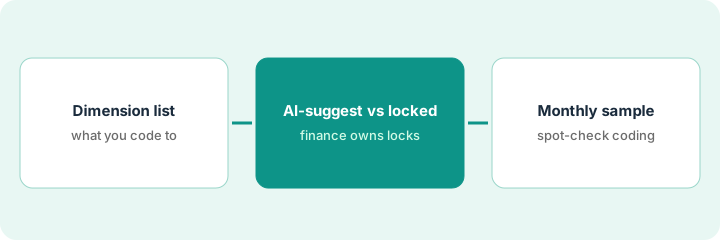
2. Step 2 — Split them: AI may suggest, finance locks
What it is: A written rule for each dimension. Some can be suggested by AI and confirmed by the person coding. Others are set only by finance, every time.
- Dimensions that feed external reporting, revenue, grants, or intercompany go on the finance-locked list.
- Dimensions used for internal views, where a mistake is easy to spot and fix, can go on the AI-may-suggest list.
- Even on the suggest list, a person confirms the value before posting. AI never posts.
- AI may only suggest values that already exist in your dimension list. No new values.
AI may suggest: Department, Location, Expense type. Finance locks: Entity, Grant, Project (because it drives billing), and Customer. The rule goes in the controller's close policy in four lines.
Standing prompt line for any AI help with coding: "Suggest only Department, Location, and Expense type, using only values from the list provided. Leave Entity, Grant, Project, and Customer blank for finance. Flag anything unclear as Unknown. A person confirms before posting."
3. Step 3 — Check a monthly sample
What it is: A small, regular check that the AI-suggested dimensions are landing correctly, and that locked ones aren't being filled by anyone outside finance.
- Each month, pull 20 transactions coded with AI help.
- Check the suggested dimensions against the source document.
- Check that every locked dimension was set by someone in finance.
- If the same dimension is wrong more than twice, move it to the locked list until the cause is fixed.
October's sample of 20 finds two Location errors, both on invoices from a vendor that serves two offices. The controller adds a note to that vendor's record saying which office to use. November's sample is clean.
Add a recurring close task: "Sample 20 AI-assisted entries. Record errors by dimension and any list changes." Name the owner.
Pricing context (October 2026)
This how-to isn't a price sheet. Sage Intacct pricing depends on modules and your contract. Check Sage's public site and your contract; packaging notes live on the Sage Intacct AI review. Dated October 2026.
Checked Oct 12, 2026 on the vendor’s own pricing page: Sage Intacct shows no public list price. A direct /pricing path on Sage’s site returned a 404 on Oct 12, 2026; Sage Intacct’s product page routes buyers to contact sales. This page quotes no Sage Intacct dollar figure; your admin and order form decide which AI assists you have.
Uncertainty: AI assist names and availability may vary by release. If your contract and our review disagree, trust your contract. The only prices this site sells here are the optional $9 AI toolkit spreadsheet and $19 AI toolkit audit.
When this helps (honest take)
Useful when you use several dimensions, more than one team codes transactions, and at least some reporting goes outside finance.
Not useful when you only code to one or two dimensions and finance enters everything. A written rule adds little there.
Related options (educational)
| Need | Where to look | Why |
|---|---|---|
| Sage Intacct AI | Sage Intacct AI | Primary path on this page |
| Accounts payable coding with AI | Stampli | Coding suggestions before the ERP |
| Finance ops stack | Stack map for finance ops | Job, tool, and owner in one view |
| Close basics | Close checklist from your books | Live how-to |
Free: seat-waste calculator if an accounts payable tool, a general AI assistant, and Intacct are all suggesting the same codes.
FAQ
Should AI post journal entries in Intacct?
No. This pattern keeps AI to suggestions that a person confirms. Posting stays with finance.
What if a dimension value is missing from the list?
AI leaves it blank and flags it. Finance decides whether to add a new value.
Where do current prices live?
With Sage and in your contract. This page doesn't invent prices. Our Oct 12, 2026 check of the vendor’s own pricing page is summarized in the pricing section above.
Which dimensions may AI suggest?
Only the ones finance marks as suggest-ok in Step 2. Locked dimensions stay human even if an assist offers a value.
Optional next step
Free reviews stay free. If several tools are suggesting codes for the same transactions before they reach Intacct, the $9 AI toolkit spreadsheet helps you lay them out, or the $19 AI toolkit audit gets you a written memo.