How-to · Hotels · RoomRaccoon · Oct 15, 2026
Start RaccoonRev Plus in co-pilot mode and approve rates by hand before you consider autopilot
RoomRaccoon RaccoonRev rules and RaccoonRev Plus can suggest or push rates in co-pilot or autopilot modes. Co-pilot comes first. This page shows how to set rules, approve rates by hand for two weeks, and only then consider autopilot with written limits.
Who this is for
Owner-operators of small independent hotels on RoomRaccoon who want AI pricing help without jumping straight to autopilot. The job here is co-pilot first.
How to do it
This is a how-to, not a ranking of small-hotel platforms. Per the RoomRaccoon AI review, RaccoonRev Plus runs in co-pilot or autopilot; the owner approves every automated rate. Dynamic pricing rules start earlier on Essentials; AI pricing with RaccoonRev Plus is listed with Pro.

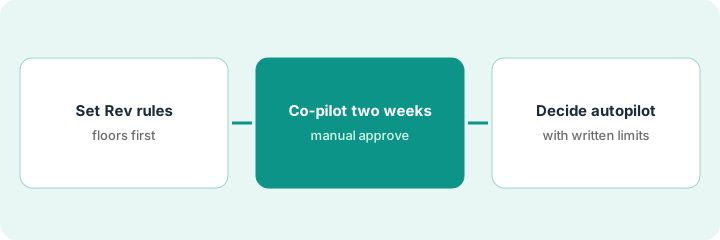
1. Step 1 — Set RaccoonRev rules
What it is: Write floors, occupancy triggers, and blackout dates in RaccoonRev before any AI pricing mode.
- Set minimum rates per room type.
- Add occupancy or lead-time rules you already trust.
- Block event dates that need manual pricing.
- Name the owner who approves AI rates.
Floors set from owner minimums. Local marathon weekend blocked for manual pricing. Co-pilot not on yet.
Export or screenshot the rule set before enabling RaccoonRev Plus.
2. Step 2 — Two weeks of co-pilot approvals
What it is: Run RaccoonRev Plus in co-pilot only: every suggested rate needs a human approve or reject.
- Enable co-pilot (not autopilot).
- Approve or reject each suggestion for fourteen days.
- Note wrong suggestions and fix underlying rules.
- Do not switch to autopilot during these two weeks.
Week one: twelve suggestions, three rejected as too low versus a concert. Floors raised. Week two quieter.
Keep a tally: “Suggested / Approved / Rejected / Rule fix.”
3. Step 3 — Decide on autopilot with written limits
What it is: Only after two quiet weeks, decide whether autopilot is allowed — and write the limits first.
- Review the two-week tally with the owner.
- Write autopilot min/max and blackout dates.
- Enable autopilot only inside those limits — or stay on co-pilot.
- Review daily for the first week of autopilot.
- Fall back to co-pilot if surprises appear.
Owner keeps co-pilot for suites and allows autopilot for standard rooms inside floors. Marathon weekend stays manual.
Write the decision on one page and date it. Revisit after thirty days.
Pricing context (October 2026)
This how-to isn't a price sheet. Per the RoomRaccoon AI review, plans use a room-count calculator; on our Oct 17, 2026 read the calculator showed example monthly figures including Entry at $207 and Premium at $387. Dated October 2026.
Checked Oct 17, 2026 on the vendor’s own pricing page: RoomRaccoon’s pricing page uses a room-count calculator for Entry, Essentials, Premium, and Pro; amounts change with room count. On our Oct 17, 2026 read, before entering rooms, the calculator showed Entry $207, Essentials $262, Premium $387 and Pro $542 a month on monthly billing, and $197 / $250 / $367 / $517 on annual billing (monthly figures were higher on our Oct 15 read). RaccoonRev Plus AI pricing is listed with Pro. Confirm the quote for your room count.
Uncertainty: Calculator amounts change with room count — confirm your quote. The only prices this site sells here are the optional $9 AI toolkit spreadsheet and $19 AI toolkit audit.
When this helps (honest take)
Useful when you can staff two weeks of co-pilot approvals.
Not useful when autopilot is turned on on day one with no floors.
Related options (educational)
| Need | Where to look | Why |
|---|---|---|
| RoomRaccoon AI | RoomRaccoon AI | Primary path |
| vs Little Hotelier | Little Hotelier vs RoomRaccoon | Side-by-side |
| Little Hotelier descriptions | Little Hotelier descriptions | Same day's how-to |
| Hospitality stack map | Stack map: hospitality ops | Where RoomRaccoon fits |
FAQ
When is autopilot allowed?
Only after two quiet co-pilot weeks and written limits.
Which plan includes RaccoonRev Plus?
Per our review, AI pricing with RaccoonRev Plus is listed with Pro (and as an upgrade tool) — confirm your plan.
Where do RoomRaccoon prices live?
See the pricing section; calculator-based. Our Oct 17, 2026 check of the vendor’s own pricing page is summarized in the pricing section above.
When should we turn on autopilot?
Only after two quiet weeks of co-pilot approvals and written min/max limits the owner signs.
Optional next step
If you want a one-page toolkit map for the tools you already pay for, use the optional $9 AI toolkit spreadsheet. If you want a short review of seat waste and unused tools, use the optional $19 AI toolkit audit. Neither is required to follow this how-to.