How-to · Hotels · Revinate · Oct 15, 2026
Use Revinate Ivy's automated call review on reservation calls, and have the reservations manager approve every script change
Revinate Reservation Sales voice channel with Ivy's automated call review can show where scripts help or hurt. Script changes still need the reservations manager. This page shows how to review ten calls, read Ivy's notes, and approve one script change. For Canary after-hours AI Voice — a different job — see that how-to.
Who this is for
Reservations managers whose teams take inbound reservation calls on Revinate. The job here is one approved script change from Ivy's call review — not after-hours voice bots.
How to do it
This is a how-to, not a ranking of hotel CRM vendors. Per the Revinate AI review, Ivy (introduced 16 Jun 2026) includes automated call review on the Reservation Sales voice channel. The reservations manager approves every AI messaging and voice script.
1. Step 1 — Pick ten recent calls
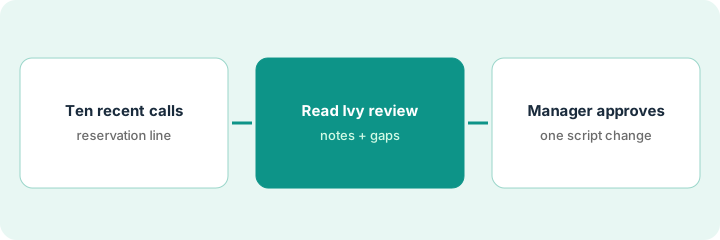
What it is: Select ten recent reservation calls that represent common intents — not only the worst calls.
- Pull ten calls from the last two weeks.
- Mix booked, not-booked, and rate questions.
- Exclude calls with payment-card read-aloud if your policy forbids replay in training.
- Name the reservations manager who approves script changes.
Ten calls: four bookings, three shoppers, three rate-policy questions. No card-data training clips.
List the ten call IDs and intents before opening Ivy's review.
2. Step 2 — Read Ivy's call review
What it is: Read Ivy's automated call review for those ten calls and write the top repeat coaching theme.
- Open Ivy's review notes for each call.
- Tally the repeat theme (missing upsell ask, unclear cancellation language, etc.).
- Ignore one-off personality notes.
- Draft at most one script change that addresses the theme.
Six of ten reviews flag unclear package inclusions. Draft script change: state what the rate includes before quoting the number.
Write “Theme / Evidence count / Draft script line” on one page.
3. Step 3 — Manager approves one script change
What it is: The reservations manager approves a single script change, then samples calls the following week.
- Manager reads the draft change.
- Approve, edit, or reject.
- Update the live script only after approval.
- Sample ten new calls the next week.
- Do not stack multiple script changes in the same week.
Manager approves the inclusions line. A second change about upsells waits until next week.
Date the script version. Roll back if next week's reviews get worse on clarity.
Pricing context (October 2026)
This how-to isn't a price sheet. Per the Revinate AI review, Revinate is demo-only with no public pricing. Dated October 2026.
Checked Oct 15, 2026 on the vendor’s own pricing page: Revinate shows no public list price. Revinate’s pricing page is demo-led; no plan dollar figures appear. This page quotes no Revinate dollar figure; confirm what your contract includes with Revinate or your admin.
Uncertainty: No public list price on the pricing page we checked. The only prices this site sells here are the optional $9 AI toolkit spreadsheet and $19 AI toolkit audit.
When this helps (honest take)
Useful when you record reservation calls and have a manager who will own script versions.
Not useful when call review is used as a grade for agents instead of a script-improvement input.
Related options (educational)
| Need | Where to look | Why |
|---|---|---|
| Revinate AI | Revinate AI | Primary path |
| Canary vs Revinate | Canary vs Revinate | Side-by-side |
| Canary AI Voice | Canary AI Voice script | A different job |
| HiJiffy hand-off rules | HiJiffy knowledge sources | Same day's how-to |
| Hospitality stack map | Stack map: hospitality ops | Where Revinate fits |
FAQ
How is this different from Canary AI Voice?
A different job: Revinate here is call review on reservation sales calls. Canary AI Voice covers after-hours answering.
Should Ivy scores go in performance reviews?
Not in this routine. Use reviews to improve the script; coaching notes stay separate.
Where do Revinate prices live?
Demo-only on the page we checked; see the pricing section. Our Oct 15, 2026 check of the vendor’s own pricing page is summarized in the pricing section above.
How is this different from Canary AI Voice?
A different job: this page is Ivy’s automated call review on reservation calls. For after-hours AI Voice scripts on Canary, see the Canary how-to.
Optional next step
If you want a one-page toolkit map for the tools you already pay for, use the optional $9 AI toolkit spreadsheet. If you want a short review of seat waste and unused tools, use the optional $19 AI toolkit audit. Neither is required to follow this how-to.