How-to · Hotels · HiJiffy · Oct 15, 2026
Approve HiJiffy's knowledge sources and hand-off rules before Aplysia answers a single guest
HiJiffy's Aplysia AI can answer across website, WhatsApp, email, and more, with staff-console suggested replies. It should only use sources and hand-offs you approve. This page shows how to approve knowledge sources and hand-off rules before Aplysia answers a single live guest.
Who this is for
Guest-services leads at hotels deploying HiJiffy / Aplysia. The job here is approved sources and hand-off rules before go-live on two channels.
How to do it
This is a how-to, not a ranking of guest-messaging bots. Per the HiJiffy AI review, Aplysia works across website, social, WhatsApp, SMS, and email with a staff console for suggested replies. The guest-services lead approves every knowledge source and hand-off rule.

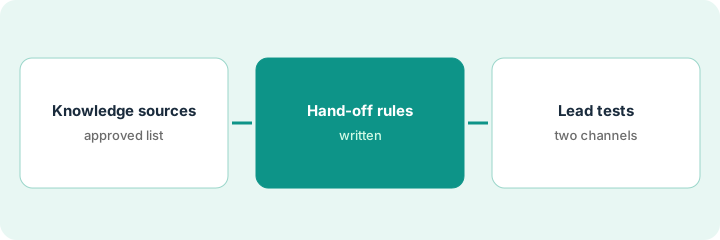
1. Step 1 — List approved knowledge sources
What it is: Write the only sources Aplysia may use, with owners and review dates.
- List website pages, PDFs, and FAQ entries allowed.
- Remove anything with old rates or hours.
- Name an owner for each source.
- Name the guest-services lead who approves the list.
Allowed: current parking page, breakfast hours page, and a one-page arrival FAQ dated this month. Old wedding PDF removed.
Keep a source register: “Source / Owner / Last reviewed.”
2. Step 2 — Write hand-off rules
What it is: Write when Aplysia must stop and hand to a person — especially billing, ID, and complaints.
- List always-handoff topics (billing, ID, medical, complaints).
- Write the guest-facing hand-off phrase.
- Set staff console expectations for suggested replies.
- Keep payment-card data out of chat tests.
Always hand off: folio disputes, ID uploads, accessibility requests. Phrase: “I’m connecting you with the desk now.”
Test the hand-off phrase once per channel before go-live.
3. Step 3 — Lead tests on two channels before go-live
What it is: The lead runs scripted tests on two channels (for example website chat and WhatsApp) before any live traffic.
- Pick two channels you will actually staff.
- Run the same five test questions on both.
- Confirm sources and hand-offs behave.
- Approve go-live in writing.
- Add a third channel only after a quiet week.
Website chat and WhatsApp pass five tests. Email stays off for week one.
Save the test transcript pack with the go-live approval.
Pricing context (October 2026)
This how-to isn't a price sheet. Per the HiJiffy AI review and our Oct 15, 2026 check, Basic starts from $109 per month and Pro from $179 per month (room-count based; setup fees separate). Dated October 2026.
Checked Oct 15, 2026 on the vendor’s own pricing page: HiJiffy’s pricing page lists Basic from $109 per month and Pro from $179 per month (room-count based, yearly billing options and setup fees shown separately). Premium and Enterprise are also room-count based; confirm Premium in your quote.
Uncertainty: Premium and Enterprise are also room-count based — confirm in your quote. The only prices this site sells here are the optional $9 AI toolkit spreadsheet and $19 AI toolkit audit.
When this helps (honest take)
Useful when you can keep a source register and staff hand-offs on the channels you enable.
Not useful when Aplysia is pointed at a stale website with no hand-off path to a person.
Related options (educational)
| Need | Where to look | Why |
|---|---|---|
| HiJiffy AI | HiJiffy AI | Primary path |
| Canary alternative | Canary Technologies AI | Related guest path |
| Asksuite (related) | Asksuite AI | Another guest-messaging review |
| Canary AI Voice | Canary AI Voice script | Same day's how-to |
| Hospitality stack map | Stack map: hospitality ops | Where HiJiffy fits |
FAQ
What is Aplysia?
Per our review, Aplysia is HiJiffy's AI assistant across web and messaging channels.
Should billing questions stay with Aplysia?
Not in this routine — always hand off billing and ID topics.
Where do HiJiffy prices live?
See the pricing section; we re-checked HiJiffy's pricing page on Oct 15, 2026. Our Oct 15, 2026 check of the vendor’s own pricing page is summarized in the pricing section above.
What is Aplysia?
Per our review, Aplysia is HiJiffy’s AI assistant across website, messaging apps, and email. It only answers from sources you approve.
Optional next step
If you want a one-page toolkit map for the tools you already pay for, use the optional $9 AI toolkit spreadsheet. If you want a short review of seat waste and unused tools, use the optional $19 AI toolkit audit. Neither is required to follow this how-to.