How-to · Restaurants · Popmenu · Oct 16, 2026
Write Popmenu AI Answering scripts, and have the FOH manager approve every answer before go-live
Popmenu AI Answering can handle restaurant phone calls with scripted answers. Scripts that go live without FOH approval still misstate hours, allergens, or ordering links. This page shows how to list call reasons, draft scripts, and approve them — testing with fake orders only.
Who this is for
Restaurant owners or FOH managers adding Popmenu AI Answering. For Yelp Host confirmed-order checks — a different job — see Yelp Host phone order GM check. For Slang reservation voice policies — another different job — see Slang voice AI policy GM own.
How to do it
This is a how-to, not a ranking. Per the Popmenu AI review, AI Answering is an add-on and marketing drafts are reviewable. The review's ground rule: the FOH manager owns guest-facing answers; tests use fake orders only — no real card numbers or live guest personal data.

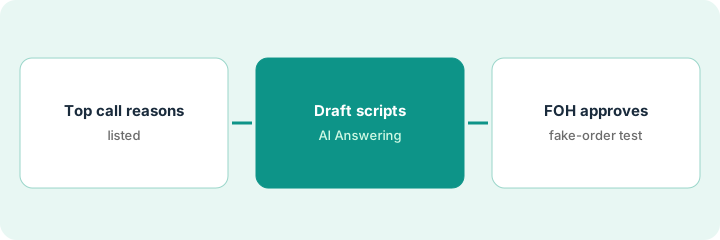
1. List top call reasons
What it is: List the top reasons guests call and the correct answer for each.
- Pull a week of call notes or voicemail themes.
- Prioritize hours, reservations links, and ordering links.
- Park complex allergen advice for a human handoff.
- Name the FOH manager who approves scripts.
Top reasons: hours, catering email, and online ordering link. Allergy deep-dives stay with a person.
Write five call reasons and the one-sentence correct answer for each.
2. Draft AI Answering scripts
What it is: Draft scripts in Popmenu; keep them off live until approved.
- Draft greetings and answers for the top reasons.
- Include handoff rules for payments and allergies.
- Keep send-to-live off.
- Align menu facts with the chef if food is mentioned.
Three scripts sit in draft. Payment and allergy calls route to staff.
Read each script aloud once before FOH review.
3. FOH approves, then test with fake orders only
What it is: FOH approves every answer, then you test with fake names and fake orders only.
- FOH approves or edits in writing.
- Test with fake guest names and no real cards.
- Go live only after a clean test.
- Review call summaries after the first busy night.
Hours and ordering-link scripts go live. Catering stays draft until the events lead rewrites the email. Tests used fake names only.
Keep a script log: topic, approver, date, test result.
Pricing context (October 2026)
This how-to isn't a price sheet. Per the Popmenu AI review, Popmenu lists Starter about $159, Essentials about $269, and Premier about $449 per month on annual prepaid pricing, with AI Answering from about $149 per month as a quoted add-on. Confirm on Popmenu's pricing page and your AI Answering quote. Dated October 2026.
Checked Oct 16, 2026 on the vendor’s own pricing page: Popmenu’s pricing page (per our review; page was bot-challenged on Oct 16, 2026) lists Starter about $159, Essentials about $269, and Premier about $449 per month on annual prepaid pricing. AI Answering is an add-on from about $149 per month per Popmenu’s FAQ — get the add-on in writing.
Uncertainty: The only prices this site sells here are the optional $9 AI toolkit spreadsheet and $19 AI toolkit audit.
When this helps (honest take)
Useful when you have clear call reasons and an FOH manager who will own answers.
Not useful when you need reservation-system voice into OpenTable or SevenRooms — see Slang — or Host takeout into POS — see Yelp Host.
Related options (educational)
| Need | Where to look | Why |
|---|---|---|
| Popmenu AI | Popmenu AI | Primary path |
| Yelp Host phone orders | Yelp Host GM check | A different job |
| Slang reservation voice | Slang voice policy | A different job |
| Restaurant stack map | Stack map: restaurant ops | Where Popmenu fits |
FAQ
How is this different from Yelp Host or Slang?
Different jobs: Popmenu is your AI Answering scripts; Yelp Host focuses on reservations/waitlist/takeout into POS; Slang focuses on reservation-voice policies into booking systems.
Can we test with a real guest card?
No. Use fake orders only — no real card numbers or live guest personal data.
Where do Popmenu prices live?
See the pricing section; get AI Answering in writing because it is quoted. Our Oct 16, 2026 check of the vendor’s own pricing page is summarized in the pricing section above.
How is this different from Yelp Host or Slang?
Different jobs: Popmenu is AI Answering scripts; Yelp Host is reservations/waitlist/takeout; Slang is reservation-voice policies.
Optional next step
If you want a one-page toolkit map for the tools you already pay for, use the optional $9 AI toolkit spreadsheet. If you want a short review of seat waste and unused tools, use the optional $19 AI toolkit audit. Neither is required to follow this how-to.