How-to · Recruiting · Paradox · Oct 12, 2026
Hand interview scheduling to Paradox only for roles with fixed slots
Paradox's assistant schedules interviews over text, which works well when every candidate gets the same kind of interview in the same open time slots. It works less well for multi-person loops that change from candidate to candidate. This page shows a recruiting ops lead how to sort roles, pilot the right ones, and keep a person on exceptions.
Who this is for
Recruiting ops and talent acquisition leads at companies with a lot of hourly or high-volume hiring, such as retail, restaurants, logistics, or healthcare, who use Paradox or are evaluating it. If your hiring is mostly salaried roles with panel interviews, the Paradox review explains why it may not be the right fit.
How to do it
This is a how-to, not a ranking. Feature detail on text-to-apply, rules-based screening, and conversational interview scheduling lives on the Paradox review.

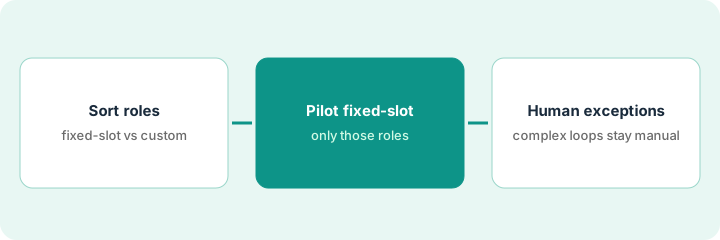
1. Step 1 — Sort roles into fixed-slot and custom
What it is: A simple list of your open roles, split by how their interviews are run.
- Fixed-slot: one interviewer (or a rotating one), the same interview format, set blocks of time each week. Example: store associate interviews Tuesday and Thursday afternoons.
- Custom: several interviewers, a loop that changes per candidate, or senior roles where the candidate's calendar drives everything.
- Count how many interviews each group had last month.
- Start only with the fixed-slot group.
Last month: 420 interviews for warehouse associates and drivers (fixed slots at each site), 35 for supervisors and office roles (custom loops). The 420 are the pilot candidates.
Make a sheet with Role | Sites | Interview format | Interviewers | Interviews last month | Fixed-slot or custom.
2. Step 2 — Pilot the fixed-slot roles
What it is: Turn on conversational scheduling for a small set of fixed-slot roles at one or two locations first.
- Load real interviewer availability. The assistant can only book what you give it.
- Write the screening rules yourself. Paradox screens on rules you set; it doesn't invent new ones.
- Decide in advance what happens with candidates who don't fit a rule (for example, can't work weekends). They go to a person, not an automatic no.
- Run for two to four weeks and track no-shows, time from apply to interview, and candidate complaints.
Pilot at two warehouses for associate roles only. Hiring managers set four interview blocks a week. Candidates who ask about schedules the rules don't cover get routed to the site recruiter.
Before launch, write the one-page pilot plan: Roles | Sites | Interview blocks | Screening rules | Who gets exceptions | What we'll measure | End date.
3. Step 3 — A human owns exceptions
What it is: A named person handles anything the assistant can't, and reviews how the assistant is talking to candidates.
- Name an exception owner for each site.
- Read a sample of candidate conversations every week to check tone and accuracy.
- Keep custom-loop roles on human scheduling until the pilot is reviewed.
- At the end date, decide with the numbers whether to expand, adjust, or stop.
A candidate texts that they need an interview after 6pm because of another job. The assistant routes it to the site recruiter, who books a one-off evening slot. The weekly conversation sample turns up one confusing message about parking, and the team fixes the wording.
Weekly 15-minute review: read 10 conversations, note anything wrong or unclear, and fix the message template the same day.
Pricing context (October 2026)
This how-to isn't a price sheet. Paradox pricing is quote-based; packaging notes live on the Paradox review. Confirm what's included with your Paradox rep. Dated October 2026.
Checked Oct 12, 2026 on the vendor’s own pricing page: Paradox shows no public list price. Paradox’s pricing page describes packages and routes to sales rather than seat figures. This page quotes no Paradox dollar amount; confirm scheduling features with your Paradox rep.
Uncertainty: Packaging can change after ownership changes; the review covers current ownership. If your contract and our review disagree, trust your contract. The only prices this site sells here are the optional $9 AI toolkit spreadsheet and $19 AI toolkit audit.
When this helps (honest take)
Useful when you run many short, similar interviews with set time blocks, and scheduling back-and-forth is eating recruiter time.
Not useful when most of your interviews are custom loops, or when nobody will own exceptions. Candidates who fall outside the rules still need a person.
Related options (educational)
| Need | Where to look | Why |
|---|---|---|
| Paradox features | Paradox | Primary path on this page |
| Video interviewing | HireVue | When the interview itself is async video |
| Talent intelligence | Eightfold | Matching and internal mobility, a different job |
| People ops stack | Stack map for people ops | Who owns what |
FAQ
Should Paradox screen candidates out automatically?
Only on rules you've written and checked, such as a legal age requirement or a required license. Anything else should go to a person. This isn't legal advice; check screening rules with HR or counsel.
Can it schedule panel interviews?
Check with Paradox for your setup. This pattern keeps multi-person, changing loops on human scheduling until a pilot shows otherwise.
Where do current prices live?
On the Paradox review and with Paradox. This page doesn't invent list prices. Our Oct 12, 2026 check of the vendor’s own pricing page is summarized in the pricing section above.
What counts as a fixed-slot role?
Roles where every interview is the same length and the same interviewer pool, on a published slot grid. Custom multi-panel loops stay with a human scheduler in this routine.
Optional next step
Free reviews stay free. If you're paying for a scheduling tool, Paradox, and applicant tracking system scheduling features that overlap, the $9 AI toolkit spreadsheet or the $19 AI toolkit audit can help you pick one home for scheduling.