How-to · Restaurants · Lightspeed · Oct 16, 2026
Ask Lightspeed AI one staffing question, and check Tempo before you change the floor plan
Lightspeed AI (conversational analytics, labelled beta) can answer staffing questions, and Tempo shows service pacing. Changing the floor plan from a single beta answer still risks over- or under-staffing. This page shows how to ask one question, verify it against a POS report, and touch Tempo only when both agree.
Who this is for
Restaurant GMs on Lightspeed Restaurant who want one verified labor answer before changing Tempo or the floor plan. For Toast IQ menu drafts — a different job — see Toast IQ menu price GM approve.
How to do it
This is a how-to, not a ranking. Per the Lightspeed Restaurant AI review, Lightspeed AI is in beta and Tempo covers service pacing and Tempo Alerts. The review's ground rule: the GM checks every Lightspeed AI sales or labor answer against the POS report before changing staffing.

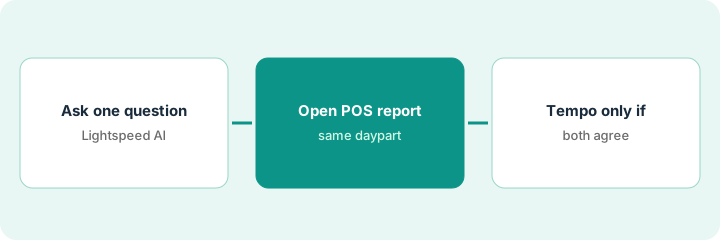
1. Ask one labor question in Lightspeed AI
What it is: Ask one plain-language staffing or sales-by-hour question; treat the answer as a draft.
- Ask one question only (for example Saturday lunch covers vs servers).
- Label the answer as beta on your notes.
- Do not change the schedule yet.
- Skip guest personal data in the chat.
GM asks which hour needed a fourth server last Saturday. Lightspeed AI points to 12–1 p.m.; GM does not cut the 2 p.m. shift yet.
Write the exact question and the AI answer on one line before you open reports.
2. Open the matching POS report
What it is: Pull the same daypart from Lightspeed POS reports and compare line by line.
- Open sales and labor for that daypart.
- Compare covers, sales, and voids to the AI answer.
- Note mismatches (comps, private events, voids).
- Decide whether the AI answer is usable.
POS shows 12–1 p.m. was busy but a private patio block skewed the AI summary. GM keeps the AI answer as context only.
Mark agree / disagree next to the AI answer before you touch Tempo.
3. Adjust Tempo only if both agree
What it is: Change Tempo pacing or Alerts only when the AI answer and the POS report agree.
- If both agree, adjust one Tempo setting or Alert.
- If they disagree, fix data or wait — do not cut staff from AI alone.
- Floor manager owns live Tempo Alerts during service.
- Re-check after one busy service.
Both agree 12–1 p.m. ran long on order-taking. Floor manager tightens one Tempo Alert; schedule stays unchanged for a week.
Log: question, AI answer, report verdict, Tempo change (or none), GM initials.
Pricing context (October 2026)
This how-to isn't a price sheet. Per the Lightspeed Restaurant AI review, Lightspeed's restaurant pricing page lists Starter $69, Essential $189, and Premium $399 per month (USD), with Lightspeed AI and Tempo shown on those plans; Kitchen Display is listed separately. Lightspeed AI was labelled beta on the AI hub. Dated October 2026.
Checked Oct 16, 2026 on the vendor’s own pricing page: Lightspeed’s restaurant pricing page (per our review; vendor page was bot-challenged on Oct 16, 2026) lists Starter $69, Essential $189, and Premium $399 per month (USD), with Lightspeed AI and Tempo shown on those plans. Lightspeed AI is labelled beta on Lightspeed’s AI hub.
Uncertainty: The only prices this site sells here are the optional $9 AI toolkit spreadsheet and $19 AI toolkit audit.
When this helps (honest take)
Useful when you have Lightspeed POS reports you trust and one GM who will verify beta answers.
Not useful when you would change staffing from a single chat answer without opening the report.
Related options (educational)
| Need | Where to look | Why |
|---|---|---|
| Lightspeed Restaurant AI | Lightspeed Restaurant AI | Primary path |
| Toast AI | Toast AI | Related POS AI |
| Toast IQ menu approval | Toast IQ GM approve | A different job |
| Restaurant stack map | Stack map: restaurant ops | Where Lightspeed fits |
FAQ
Is Lightspeed AI generally available?
Per our review, Lightspeed's AI hub labelled Lightspeed AI in beta. Confirm access on your account.
Do Tempo Alerts change the schedule by themselves?
No. Alerts prompt the floor manager; staffing changes still need the GM and the POS report.
Where do Lightspeed prices live?
Starter $69, Essential $189, Premium $399 on the page we and the review checked; confirm Tempo Alerts entitlement on your quote. Our Oct 16, 2026 check of the vendor’s own pricing page is summarized in the pricing section above.
Is Lightspeed AI generally available?
Per our review, Lightspeed’s AI hub labelled Lightspeed AI in beta. Confirm access on your account.
Optional next step
If you want a one-page toolkit map for the tools you already pay for, use the optional $9 AI toolkit spreadsheet. If you want a short review of seat waste and unused tools, use the optional $19 AI toolkit audit. Neither is required to follow this how-to.