How-to · Go-to-market writing · Copy.ai · Oct 22, 2026
Build one Copy.ai Workflow from your Infobase, and have an editor approve every output before it ships
Copy.ai pairs Chat drafting with Infobase, shared context such as product facts and voice notes, and Workflows that chain research, drafting, and formatting into a repeatable process. Workflows are the main reason team tiers cost what they do. This page shows how to build one Workflow from approved sources, have an editor approve every output, and decide honestly between Chat and a team plan.
Who this is for
Marketers, founders, and go-to-market teams who ship outbound, landing pages, or sales email every week. The job here is one repeatable Workflow with an editor in the loop. For setting up Jasper Brand Voice and Knowledge for one campaign — a different job (brand-governed campaign drafting) for the same writers — see Jasper Brand Voice campaign.
How to do it
This is a how-to, not a ranking of writing tools. Per the Copy.ai review, Chat handles briefs, drafts, rewrites, and variants; Infobase holds product facts, voice notes, and ideal-customer notes so drafts stay consistent; and Workflows chain steps so a repeatable go-to-market job runs as a process. The review calls the jump from the Chat price to team plans the real decision: buy Workflows when process, not prose, is the bottleneck. The ground rule: nothing a Workflow produces ships until a named editor approves it.

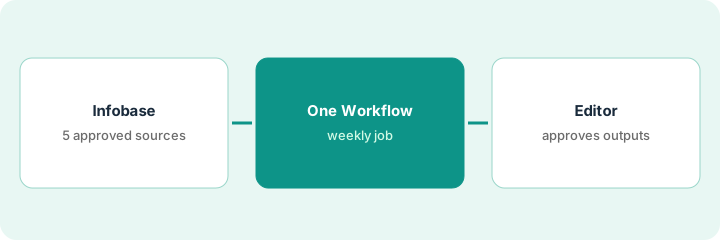
1. Load the Infobase with five approved sources
What it is: Infobase only helps if what goes in is approved. Add five sources your team already signs off on, plus a short list of banned phrases, and test that drafts respect them.
- Pick five approved sources: product one-pager, pricing page copy, two customer stories, voice notes.
- Add five banned phrases and one sample of a good email.
- Ask Chat for one cold email and check it against the banned list.
- If it ignores your rules, fix the Infobase before going further.
The content lead loads five approved sources and five banned phrases. The first test email uses one banned phrase and claims an integration the product does not have. She adds a line to the Infobase listing current integrations, and the second test passes.
Add five approved sources and five banned phrases to Copy.ai’s Infobase, ask Chat for one email, and fix the Infobase if the draft breaks a rule or invents a fact.
2. Build one Workflow for a job that ships every week
What it is: Pick one job with a fixed shape that ships weekly, such as account briefs turned into outreach openers, and build only that Workflow. Simulate the step by hand once before you build it.
- Name the weekly job and its owner.
- Run one step by hand in Chat first: five account one-liners in, five openers out.
- Build the Workflow with the same inputs and output format.
- Set a success measure, such as twenty reviewed openers a week.
The growth marketer runs five account one-liners by hand, then builds a Workflow that turns a list of accounts into a table of account, opener, and next step. The first run produces 20 openers in the format the sales team asked for.
Pick one weekly job, run one step by hand in Chat, then build a single Copy.ai Workflow with the same inputs and a written success measure.
3. A named editor approves every output, then decide Chat or team plan
What it is: Every Workflow output goes to a named editor who approves, edits, or rejects it before anything is sent or published. After 30 days, decide whether the Workflow earns a team plan or a Chat seat is enough.
- Name the editor and the place outputs wait for approval.
- Have the editor mark each output approved, edited, or rejected with a reason.
- Write a cancel-by date 30 days out.
- If no Workflow ships weekly by then, stay on Chat or a general assistant.
The editor approves 14 of 20 openers in week one, edits 4, and rejects 2 that flattered the prospect instead of naming a real problem. After 30 days the Workflow ships every week, so the director takes the team-plan quote to finance with the approval log attached.
Name an editor who approves every Workflow output before it ships, log approved, edited, and rejected, and set a 30-day cancel-by date before any team plan.
Pricing context (October 2026)
This how-to isn’t a price sheet. Per the Copy.ai review, individual Chat sits near other writing seats while team tiers jump to four-figure monthly pricing for Workflows, credits, and seats. We rechecked the review’s September 2026 prices on Copy.ai’s pricing page on Oct 22, 2026 (below). Dated October 2026.
Checked Oct 22, 2026 on the vendor’s own site: Copy.ai’s pricing page lists Chat at $29/month billed monthly or $24/month billed annually, and Growth at $1,000/month billed annually; larger team plans and Enterprise are higher or custom (September 2026, per our review; checked Oct 22).
Uncertainty: The only prices this site sells here are the optional $9 AI toolkit spreadsheet and $19 AI toolkit audit.
When this helps (honest take)
Useful when someone ships go-to-market writing weekly, one job has a fixed repeatable shape, and an editor will approve every output.
Not useful when ChatGPT or Claude already covers your drafts, Chat would sit idle, or you would buy a team plan with no Workflow owner.
Related options (educational)
| Need | Where to look | Why |
|---|---|---|
| Go-to-market Workflows plus Chat drafts | Copy.ai | Primary path |
| Brand-governed campaign drafting | Jasper Brand Voice campaign | A different job |
| General drafting seats compared | Claude vs ChatGPT for ops | If drafts are the only job |
| Where sales writing tools fit | Stack map: sales ops | Broader map |
FAQ
What is Copy.ai Infobase?
Shared context such as product facts, voice notes, and ideal-customer notes so drafts stay consistent across chats and Workflows. Feature names and limits change; confirm in Copy.ai’s docs.
When is a Workflow worth it?
Per our review, when process, not prose, is the bottleneck: one job ships every week in a fixed shape and someone owns it.
Can we use ChatGPT and Copy.ai together?
Only if the jobs do not overlap. Name the job Copy.ai owns, such as one weekly Workflow, before paying for both.
What does Copy.ai cost?
On Oct 22, 2026 Copy.ai’s pricing page listed Chat at $29 a month billed monthly or $24 a month billed annually, and Growth at $1,000 a month billed annually (September 2026, per our review; checked Oct 22).
Optional next step
If you want a one-page toolkit map for the tools you already pay for, use the optional $9 AI toolkit spreadsheet. If you want a short review of seat waste and unused tools, use the optional $19 AI toolkit audit. Neither is required to follow this how-to.