How-to · Engineering · CodeRabbit · Oct 19, 2026
Let CodeRabbit comment on pull requests, and have the reviewer triage every comment before approving
CodeRabbit posts review comments on pull requests so humans catch missing tests and risky diffs faster. A quiet bot is not approval. This page shows how to triage every comment and keep a human approve. GitLab Duo MR summaries are a different job inside GitLab.
Who this is for
Small engineering and ops teams that review pull requests on GitHub or GitLab with CodeRabbit. The job here is comment triage before human approve.
How to do it
This is a how-to, not a ranking of review bots. Per the CodeRabbit review, CodeRabbit leaves review comments on pull requests a human still approves. The ground rule: nobody approves because the bot was quiet or loud — a person triages comments and then approves.
1. Turn on for one repo
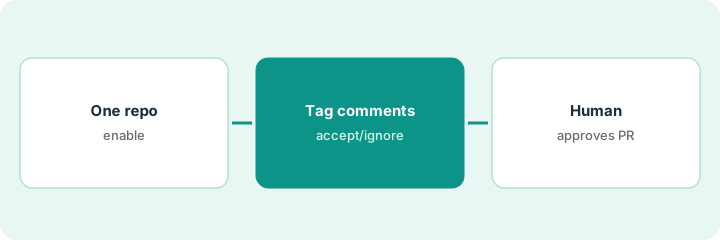
What it is: Enable CodeRabbit on one active repo, preferably with infra or ops paths you care about.
- Confirm the GitHub or GitLab integration.
- Start with one repo, not the whole org.
- Tell reviewers triage is required.
- Pin paths where bot comments are never enough (infra, migrations).
- Leave merge rules requiring human approve.
The team enables CodeRabbit on the glue-scripts repo. Production Terraform stays on a stricter human review path too.
Enable one repo and write “human approve still required” in the contributing guide.
2. Reviewer tags each comment accept or ignore
What it is: On each pull request, the reviewer tags comments act/accept, ignore, or wrong — and replies to wrong ones.
- Read the summary and inline comments.
- Tag each comment.
- Reply when the bot is wrong so others are not misled.
- Do not click approve yet.
- Narrow noisy rules if ignore rate is high.
The bot flags missing second reviewer on a branch-protection change (accept) and nits a generated file (ignore).
Tag every comment before you consider approval.
3. Human approves the PR; track noise for two weeks
What it is: A person with write access approves after triage, and the team counts ignored vs accepted comments for two weeks.
- Human approve remains mandatory.
- Track noise weekly.
- Narrow paths if people mute the bot.
- Keep GitLab Duo or other bots from double-commenting without a plan.
- Revisit after two weeks.
After triage the reviewer approves. Week-one ignore rate is high on style nits; rules are narrowed to infra and tests.
Approve only after triage, and chart noise for two weeks.
Pricing context (October 2026)
This how-to isn’t a price sheet. CodeRabbit’s pricing page (checked Oct 19, 2026) lists Pro at $24 per user per month billed annually ($30 monthly) and higher tiers at $48 and $72 per user per month annual. Confirm on coderabbit.ai/pricing. Dated October 2026.
Checked Oct 19, 2026 on the vendor’s own pricing page: CodeRabbit’s pricing page lists Pro at $24 per user per month billed annually ($30 monthly) and higher tiers at $48 and $72 per user per month annual.
Uncertainty: The only prices this site sells here are the optional $9 AI toolkit spreadsheet and $19 AI toolkit audit.
When this helps (honest take)
Useful when you want PR comments with mandatory human triage and approve.
Not useful when reviewers will mute the bot, or merge rules allow bot-only approve.
Related options (educational)
| Need | Where to look | Why |
|---|---|---|
| CodeRabbit | CodeRabbit | Primary path |
| GitLab Duo MR summary | GitLab Duo MR summary check | A different job |
FAQ
Can the bot approve the pull request?
No. Per our review, approval stays with a person who has write access.
How much does CodeRabbit cost?
CodeRabbit lists Pro at $24/user/mo annual on its pricing page (checked Oct 19, 2026). Confirm current tiers there.
Optional next step
If you want a one-page toolkit map for the tools you already pay for, use the optional $9 AI toolkit spreadsheet. If you want a short review of seat waste and unused tools, use the optional $19 AI toolkit audit. Neither is required to follow this how-to.