How-to · Hotels · Agilysys · Oct 15, 2026
Review Agilysys guestsense.ai suggestions so a department head signs off on anything touching a folio or POS check
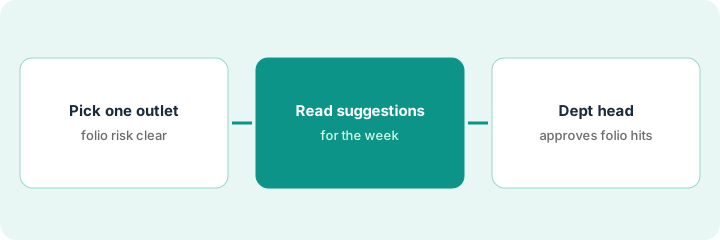
Agilysys guestsense.ai and Intelligent Guest Profile can suggest personalization and revenue actions across PMS and InfoGenesis POS. Suggestions that change a folio or POS check still need a department head. This page shows how to pick one outlet, read a week of suggestions, and approve only the folio-touching items in writing.
Who this is for
Resort and casino ops leads on Agilysys who want guestsense.ai help without silent folio changes. The job here is one outlet and a named department-head gate.
How to do it
This is a how-to, not a ranking of hospitality suites. Per the Agilysys AI review, guestsense.ai sits across PMS, InfoGenesis POS, and guest experience with Intelligent Guest Profile personalization. The review's ground rule: the department head approves every AI suggestion that touches a guest folio or POS check.
1. Step 1 — Pick one outlet
What it is: Choose one restaurant, bar, or outlet where folio risk is clear and a department head is available daily.
- Pick one outlet for the pilot week.
- Name the department head who approves folio changes.
- List which suggestion types can touch a folio or POS check.
- Leave all other outlets on human-only for now.
The food and beverage director picks the steakhouse. The outlet manager is the approver. Spa and casino floor stay out of the pilot.
Write “Outlet / Approver / Folio-touching suggestion types” on one page before you open the suggestion list.
2. Step 2 — Read the week's suggestions
What it is: Each day, read guestsense.ai suggestions for that outlet and sort folio-touching items from display-only tips.
- Open the week's suggestions for the outlet.
- Tag each as display-only or folio/POS-touching.
- Ignore display-only tips for this routine's approval gate.
- Queue folio-touching items for the department head.
Twelve suggestions: nine are seating or offer display tips; three would add a tasting menu charge. Only the three go to the head.
Keep a daily count: “Display-only / Folio-touching / Sent to approver.”
3. Step 3 — Department head approves folio or POS items only
What it is: The department head signs off on every folio or POS-touching suggestion before it applies.
- Head reads each queued suggestion.
- Approve, edit, or reject in writing.
- Apply only approved items.
- Log the decision with date and name.
- End the week with a short review of overrides.
Two tasting-menu adds are approved; one auto-gratuity suggestion is rejected because the party type was wrong.
Do not let folio-touching suggestions auto-apply. If the product can auto-apply, turn that off for the pilot outlet.
Pricing context (October 2026)
This how-to isn't a price sheet. Per the Agilysys AI review, Agilysys is enterprise quote pricing with no public dollar amounts. Dated October 2026.
Checked Oct 15, 2026 on the vendor’s own pricing page: Agilysys shows no public list price. Agilysys’ site is enterprise sales-led; no plan dollar figures appear. This page quotes no Agilysys dollar figure; confirm what your contract includes with Agilysys or your admin.
Uncertainty: No public list price on the pages we checked. The only prices this site sells here are the optional $9 AI toolkit spreadsheet and $19 AI toolkit audit.
When this helps (honest take)
Useful when one outlet has a daily department head and clear folio risk.
Not useful when suggestions auto-apply to folios with no approval queue, or the outlet has no named head.
Related options (educational)
| Need | Where to look | Why |
|---|---|---|
| Agilysys AI features | Agilysys AI | Primary path |
| OPERA Cloud path | OPERA Cloud AI | Related PMS |
| OPERA room assignment | OPERA Cloud room assignment | Same day's how-to |
| Hospitality stack map | Stack map: hospitality ops | Where Agilysys fits |
FAQ
What counts as touching a folio?
Anything that adds, moves, voids, or discounts a charge on the guest folio or POS check.
Can display-only tips skip approval?
Yes for this routine's gate — still glance at them weekly for brand tone.
Where do Agilysys prices live?
Quote-only; see the pricing section. Our Oct 15, 2026 check of the vendor’s own pricing page is summarized in the pricing section above.
What counts as touching a folio?
Anything that adds, moves, or voids a charge, a package, or a POS check line. Those wait for the department head.
Optional next step
If you want a one-page toolkit map for the tools you already pay for, use the optional $9 AI toolkit spreadsheet. If you want a short review of seat waste and unused tools, use the optional $19 AI toolkit audit. Neither is required to follow this how-to.