What’s new · Zapier · Sep 2026
What’s new in Zapier (Sep 2026): changes ops should notice
Dated changelog-style guide — Zapier changes that affect ops automation owners. Not a rehash of the Zapier deep-dive or the Zapier Central how-to — those remain the how-tos; this page is what moved in September 2026 per public Zapier sources.
Who this changelog is for
Ops leads who already run (or are evaluating) Zapier for polished app-to-app paths and need a dated “what actually moved” note for September 2026 — especially Next Gen Zaps early access and related ops-relevant behavior. Deep how-tos stay on zapier and zapier-central. Peers: Make, n8n, What’s new in n8n (Sep 2026).
Sep 2026 snapshot (picture)


Uncertainty flag: Next Gen Zaps is described as early access by request with limited availability. Treat Community/Help posts as directional; confirm on your account, plan, and admin role before you rewrite SOPs. Product naming around Central / Agents / AI by Zapier has also been consolidating — verify live Help articles.
Primary prompt (Marketing SoT) — run against Zapier’s public Sep 2026 notes, not rumor threads:
From Zapier public Sep 2026 notes, list 5 ops-relevant changes — cite sources.
Changes that matter for ops teams
Examples at a glance: each change below includes a concrete ops example plus a short Try this. We cite public Zapier Community/Help; if a detail is not verified on those pages, we hedge.
1. Next Gen Zaps + Workflow Manager — NL, code, canvas, MCP deploy
What changed (public ≈ Sep 23, 2026 — Zapier Community / ZapConnect 2026): Zapier unveiled Next Gen Zaps: describe workflows inside MCP-enabled tools (Claude, ChatGPT, Cursor) and deploy to Zapier, or build in Zapier with natural language, TypeScript, or a visual canvas via the Workflow Manager.
Sources: The next generation of Zaps is here (Sep 23, 2026); Use the Workflow Manager (updated Sep 18, 2026); Get started with Next Gen Zaps.
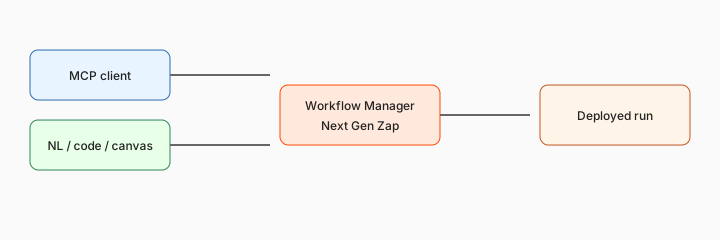
If Next Gen early access is available on your seat:
Draft a Next Gen Zap outline: Form → Sheet enrich → Slack owner → pause if amount blank. List every write step that needs a human gate before publish.
2. Larger list processing — no more classic 500-item loop cap (claimed)
What changed (public ≈ Sep 23, 2026 Community post): Zapier’s Next Gen announcement states you can process entire lists with no more 500-item loop cap, and nest loops for rollups. Confirm behavior and plan limits in your early-access account — do not assume unlimited throughput or that classic Zaps inherit the same cap change.
Source: same Community Next Gen post.
On a sample list only:
From this pasted CSV header + 20 sample rows: outline a Next Gen list loop that tags status and rolls up counts. Do not invent columns. Flag where classic 500-item limits used to bite.
3. Branches that split and rejoin
What changed (public ≈ Sep 23, 2026): Next Gen Zaps advertise branches that split and rejoin so data can route down different paths, then merge and continue — plus error handling that keeps going so one failure doesn’t stop the whole run. Useful for ops routing (VIP vs standard, complete vs missing fields) without fragile duplicate Zaps — still verify merge semantics in your early-access environment.
Source: Community Next Gen post.
Branch design:
Design a split/rejoin for: complete invoice → AP channel; missing PO → requester; both → status Sheet. List fields required at the merge.
4. Pause mid-run for human reply, then resume
What changed (public ≈ Sep 23, 2026): Next Gen Zaps can pause mid-run for a human reply or scheduled follow-up, then resume automatically. That is the ops-friendly pattern for approvals without spinning a separate approval Zap — confirm notification channels and timeout behavior in Help before you put money paths on auto-resume.
Source: Community Next Gen post.
Pause design:
Write a pause/resume brief: trigger field, who is asked, timeout path, and what must stay human even after resume.
5. Agentic Management — monitor, diagnose, heal (with your approval settings)
What changed (public ≈ Sep 18–23, 2026 Help): Agentic Management lets an agent watch Next Gen Zap runs, diagnose failures, and prepare fixes. Capabilities include Heal, Optimize, and optionally automatically apply fixes that do not change what the workflow can do. Failed runs retry (Help cites up to five times) before the agent starts; email notifications cover stages during early access. Keep auto-apply off for money/access writes until you trust version history review.
Source: Agentic Management in Next Gen Zaps (updated Sep 18, 2026).
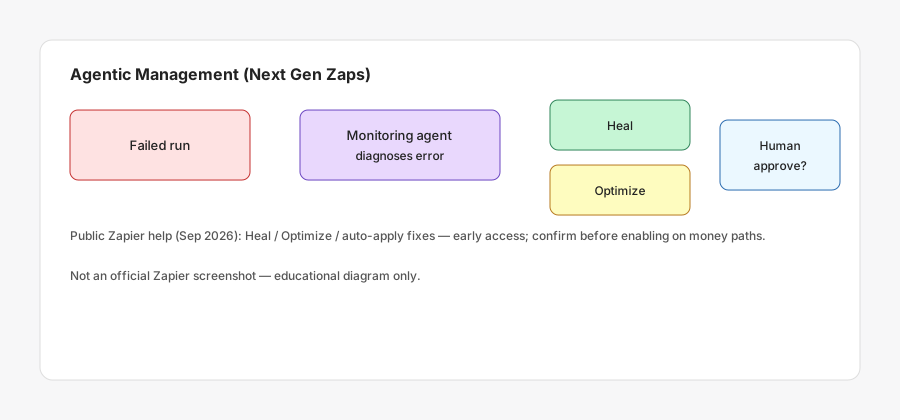
Policy for agentic fixes:
List 3 Zap failure types where Agentic Management may auto-suggest a fix, and 3 where a human must approve every change — with reasons.
What did not change for ops (still use the deep-dives)
- Classic Zap task economics still matter — see Zapier vs Make / n8n.
- Central / Agents packaging continues to evolve; use Zapier Central for bot-style jobs and verify live naming (Agents / AI by Zapier migration docs exist — confirm current status on Zapier Help).
- Sep 2026 product updates also call out action items such as Zendesk API token deprecation — ops should triage integration breakages separately from Next Gen pilots.
- Human review still owns money, access, and external customer sends — pause/heal features help; they do not replace judgment.
Vs Make / n8n / Central (brief)
Make remains the visual scenario peer when you need complex routers on a scenario model. n8n and What’s new in n8n (Sep 2026) matter when you self-host or care about ownership of Sunday-night failures. Zapier Central is for bot/agent teammates — complementary to this Next Gen Zap changelog, not a substitute.
Pricing & access context (September 2026)
Next Gen Zaps early access is described as available to request on paid plans (Pro, Team, Enterprise) at zapier.com/workflow/early-access; Team requests must come from an account owner/admin; Enterprise may need Support. Task usage and plan limits still live on Zapier’s public pricing. This page is dated September 2026 and is not a price sheet — we do not invent exact task prices.
Uncertainty: Early-access gates, Enterprise feature gaps (Help lists several classic features not supported yet in Next Gen), and task multipliers for AI steps change. Always confirm in-product and on Zapier Help before budgeting.
When this update helps (honest take)
It tends to help when ops already lives in Zapier, needs richer branching/pause patterns, wants MCP-assisted draft → Workflow Manager review, or wants monitored healing with human approval on non-critical paths first.
It tends not to help when early access is not on your account yet, when Enterprise controls you need are still listed as unsupported in Next Gen Help, when you need self-hosted ownership (n8n), or when a simple classic Zap already works. Soft next step below only if Zapier, Make, n8n, and chat seats overlap on the same weekly jobs.
Paying for Zapier and a few other AI tools? The $9 AI toolkit spreadsheet lists every AI subscription you have, what each one costs, and how fast it pays for itself, so you can see which ones are worth the money.
Want someone to do it for you? AI toolkit audit — $19
FAQ
What changed in Zapier in September 2026 that ops should notice?
Next Gen Zaps (MCP/NL/code/canvas), larger list loops, split/rejoin branches, pause/resume, and Agentic Management — plus Sep product-update action items like Zendesk token deprecation. Confirm early access.
Are Next Gen Zaps GA for everyone?
No. Public posts describe early access by request on paid plans with limited availability.
How does this relate to Zapier Central?
Different job. See Zapier Central; verify live naming for Agents / AI by Zapier.
Where is the deeper Zapier guide?
zapier.html. This page is the dated Sep 2026 changelog only.
Optional next step (if seats overlap)
If Zapier is one of several automation/AI seats doing the same weekly handoffs, optional help: $19 AI toolkit audit or $9 AI toolkit spreadsheet. Email hello@aiproduct.reviews with subject Audit $19 or Toolkit spreadsheet $9 if you prefer.
Checkout is live via Stripe. After you pay, we email delivery (spreadsheet) or intake next steps (audit).