How-to · Restaurants · Square · Oct 16, 2026
Let Square Managerbot and AI ordering channels sync a menu change only after the owner approves
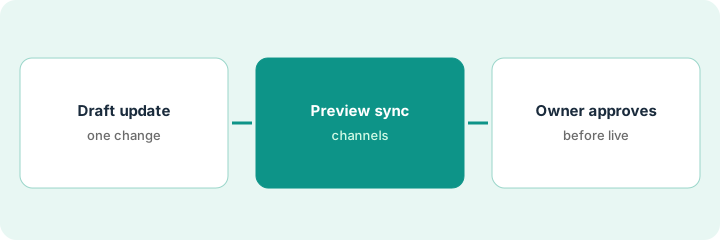
Square AI (beta), Managerbot (open beta), and AI ordering channels can push menu updates outward. Sync that runs before the owner reviews still creates wrong prices on guest channels. This page shows how to draft one update, preview sync, and approve before channels change.
Who this is for
Restaurant owners on Square for Restaurants who want Managerbot and AI ordering channels to sync menu changes only after owner approval. For Toast IQ menu drafts with GM approval — a different job — see Toast IQ menu price GM approve.
How to do it
This is a how-to, not a ranking. Per the Square for Restaurants AI review, Square AI and Managerbot are in beta / open beta, and AI ordering channels can surface your menu. The review's ground rule: the owner approves every menu or price sync before guest-facing channels update.
1. Draft one menu update
What it is: Pick one item or section change and write the intended name, price, and channel list.
- Choose one change (for example a weekend special or a price fix).
- List channels that must stay in sync (online ordering, Maps, AI ordering).
- Name the owner who approves sync.
- Label Square AI and Managerbot as beta on your sheet.
They draft a one-dollar pastry price fix and list Square Online plus AI ordering channels. Dinner entrees stay untouched.
Write old price, new price, and channels on one line before you open Managerbot.
2. Preview Managerbot and channel sync
What it is: Use Managerbot / channel tools to preview how the change will appear; keep publish off.
- Generate the draft sync preview.
- Check names and prices on each listed channel.
- Keep ChatGPT, Claude, and Maps updates off until step 3.
- Note any beta warnings Square shows.
Preview shows the pastry at the new price on online ordering. Maps still shows the old price until owner approval.
Screenshot or note each channel's preview before you ask the owner.
3. Owner approves before listings update
What it is: The owner approves the sync, then you confirm each channel after go-live.
- Owner approves or edits in writing.
- Turn on sync only for approved items.
- Check AI ordering and Maps within an hour.
- Revert if any channel shows the wrong price.
- Log beta quirks for Square support if needed.
Pastry sync goes live after owner initials. One AI channel lags twenty minutes; owner waits before adding a second item.
Keep a sync log: item, channels, approved by, date, beta notes.
Pricing context (October 2026)
This how-to isn't a price sheet. Per the Square for Restaurants AI review and Square's restaurant pricing page (checked Oct 16, 2026), Square Free is $0, Plus $49, and Premium $149 per location per month. Square AI is labelled beta. Dated October 2026.
Checked Oct 16, 2026 on the vendor’s own pricing page: Square’s restaurant pricing page lists Square Free at $0, Plus at $49, and Premium at $149 per location per month. Square AI is labelled beta; Managerbot is open beta per our review.
Uncertainty: The only prices this site sells here are the optional $9 AI toolkit spreadsheet and $19 AI toolkit audit.
When this helps (honest take)
Useful when you run Square for Restaurants and need one owner on every outward menu sync.
Not useful when you are still on Toast-only channels — use the Toast IQ how-to instead.
Related options (educational)
| Need | Where to look | Why |
|---|---|---|
| Square for Restaurants AI | Square for Restaurants AI | Primary path |
| Toast vs Square | Toast vs Square | Side-by-side |
| Toast IQ menu approval | Toast IQ GM approve | A different job |
| Restaurant stack map | Stack map: restaurant ops | Where Square fits |
FAQ
How is this different from Toast IQ approval?
A different job: this page is Square Managerbot and AI channel sync with owner approval. Toast IQ is menu drafts inside Toast with GM approval.
Are Square AI and Managerbot generally available?
Per our review, Square AI is beta and Managerbot is open beta. Treat sync as a pilot until Square and your owner say otherwise.
Where do Square prices live?
Free $0, Plus $49, Premium $149 per location on the page we checked; see the pricing section. Our Oct 16, 2026 check of the vendor’s own pricing page is summarized in the pricing section above.
Are Square AI and Managerbot generally available?
Per our review, Square AI is beta and Managerbot is open beta. Treat outward sync as a pilot.
Optional next step
If you want a one-page toolkit map for the tools you already pay for, use the optional $9 AI toolkit spreadsheet. If you want a short review of seat waste and unused tools, use the optional $19 AI toolkit audit. Neither is required to follow this how-to.