How-to · Restaurants · SevenRooms · Oct 16, 2026
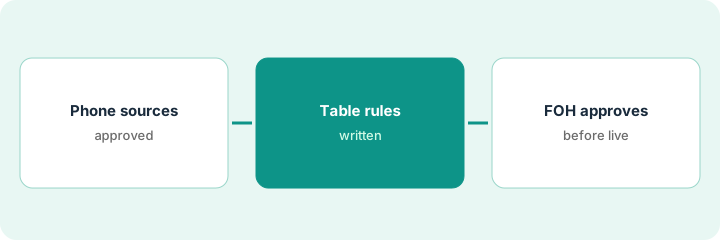
Turn on SevenRooms Voice AI and AI Table Management, and have the FOH manager approve phone answers and seating rules
SevenRooms Voice AI and AI Table Management can answer phones and suggest seating. Rules that go live without FOH approval still seat the wrong parties. This page shows how to write answer sources, set seating rules, and approve both before go-live.
Who this is for
Restaurant FOH managers or GMs on SevenRooms enabling Voice AI and AI Table Management. For OpenTable Concierge and review replies — a different job — see OpenTable Concierge reply FOH own.
How to do it
This is a how-to, not a ranking. Per the SevenRooms AI review, Voice AI, AI Table Management, and related AI responses need FOH approval. SevenRooms commercial terms are quote-only on the pages we checked.
1. Write phone answer sources
What it is: Write the sources Voice AI may use for hours, policies, and booking rules.
- Approve a short knowledge list.
- Ban unverified promotions.
- Define handoff for VIP and large parties.
- Name the FOH approver.
Hours, dress, and standard party sizes approved. Wine-pairings pitches stay off Voice for week one.
Initial each source before enabling Voice.
2. Set AI Table Management rules
What it is: Set seating priorities, turn-time assumptions, and which party sizes AI may place.
- Write min/max party sizes AI may seat.
- Protect VIP and accessibility tables for people.
- Keep AI suggestions on review until step 3.
- Align with your floor plan reality.
AI may suggest two-tops and four-tops only. Banquets stay manual.
Walk the floor once with the rules sheet in hand.
3. FOH approves replies and seating before go-live
What it is: FOH approves phone answers and seating rules, then monitors the first weekend.
- Approve Voice answers and seating rules in writing.
- Go live for one service first if possible.
- Review recordings or summaries daily.
- Pause Voice or table AI if guests are surprised.
Voice goes live Friday lunch; table AI stays suggest-only until Saturday. FOH reviews both Sunday.
Log: Voice on/off, table AI mode, approver, issues.
Pricing context (October 2026)
This how-to isn't a price sheet. Per the SevenRooms AI review, SevenRooms shows no public list price; plans are quote-only. Dated October 2026.
Checked Oct 16, 2026 on the vendor’s own pricing page: SevenRooms shows no public list price. SevenRooms’ site is sales-led; Voice AI and AI Table Management packaging is on the quote. This page quotes no SevenRooms dollar figure; confirm what your contract includes with SevenRooms or your admin.
Uncertainty: The only prices this site sells here are the optional $9 AI toolkit spreadsheet and $19 AI toolkit audit.
When this helps (honest take)
Useful when you run SevenRooms and FOH will own phone answers and seating rules.
Not useful when you need OpenTable Concierge FAQs instead — use that how-to.
Related options (educational)
| Need | Where to look | Why |
|---|---|---|
| SevenRooms AI | SevenRooms AI | Primary path |
| SevenRooms vs OpenTable | SevenRooms vs OpenTable | Side-by-side |
| OpenTable Concierge replies | OpenTable Concierge FOH | A different job |
| Restaurant stack map | Stack map: restaurant ops | Where SevenRooms fits |
FAQ
How is this different from OpenTable Concierge?
A different job: this page is SevenRooms Voice AI and AI Table Management. OpenTable Concierge and Pro review replies are on that how-to.
Does SevenRooms publish prices?
No public list price on the pages we and the review checked; get a written quote. Our Oct 16, 2026 check of the vendor’s own pricing page is summarized in the pricing section above.
Should AI seat accessibility tables?
Not in this routine. Keep accessibility and VIP tables with a person.
Should AI seat accessibility tables?
Not in this routine. Keep accessibility and VIP tables with a person.
Optional next step
If you want a one-page toolkit map for the tools you already pay for, use the optional $9 AI toolkit spreadsheet. If you want a short review of seat waste and unused tools, use the optional $19 AI toolkit audit. Neither is required to follow this how-to.