How-to · Project hubs · Hive · Oct 22, 2026
Use Hive AI for weekly project summaries and risk bullets, and have the project manager check every bullet before it goes out
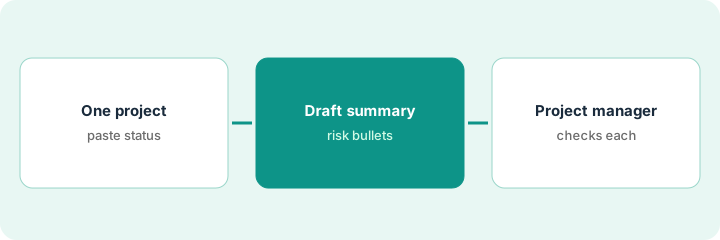
Hive AI can draft risk bullets and a weekly summary from a project status paste, and propose next actions from the actions that exist. This page shows how to run it on one project for a few weeks while the project manager checks every bullet before stakeholders see it, and how to turn action drafts into tasks without inventing owners or dates.
Who this is for
Ops teams and project managers already using Hive as a project hub who want help drafting weekly summaries and risk notes. The job here is one project, one weekly summary, and a person checking every bullet.
How to do it
This is a how-to, not a ranking of project tools. Per the Hive AI review, Hive AI proposes risk bullets and a weekly summary from a project status paste, and drafts next actions from the actions that exist; it does not change status on its own. The review warns never to invent owners or due dates when fields are blank, and to mark them Unknown. Resourcing notes are discussion prompts, not capacity truth. Feature names and packaging change, so verify on Hive’s site. The ground rule: the project manager edits and approves every bullet before anyone outside the team sees it.
1. Pick one project and paste its status
What it is: Choose one active project with a weekly stakeholder update. Paste the current status, open actions, and blockers so the draft starts from what is true.
- Pick one project with a weekly update audience.
- Paste the status notes, open actions with owners and due dates, and known blockers.
- Leave blank fields blank; do not fill them in for the AI.
- Name the project manager who approves the update.
The project manager picks the spring conference project and pastes 12 open actions; three have no owner yet. She leaves them blank on purpose to see how the draft handles it.
Pick one project, paste its status, open actions, and blockers into Hive as they are, and name the project manager who approves the weekly update.
2. Generate the weekly summary and risk bullets
What it is: Ask Hive AI for a weekly summary and risk bullets from the paste. Every risk bullet should point to something in the status; anything else is a guess.
- Ask for a short weekly summary and up to five risk bullets.
- Ask that missing owners and dates be marked Unknown.
- Check that each risk bullet points to a real item in the status.
- Note any bullet that adds a severity the status does not support.
The draft lists four risks. Three tie to real items: a late permit, a consultant without a start date, and a budget line over plan. The fourth calls a minor delay “critical,” which nothing in the status supports.
Generate a weekly summary and up to five risk bullets in Hive AI, and check that every bullet points to a real item in the status.
3. The project manager checks every bullet and turns actions into owned tasks
What it is: The project manager edits or removes each bullet before the update goes out, then turns action drafts into tasks with real owners and dates set by people, not the draft.
- Have the project manager accept, edit, or remove each risk bullet.
- Remove any severity the status does not support.
- Turn action drafts into Hive tasks; leave owners Unknown until someone agrees to take them.
- Repeat for three weeks and note how many bullets needed edits.
The program manager removes the “critical” label, keeps three bullets with small edits, and assigns two of the three unowned actions after a quick call. Over three weeks, edits drop as the status notes get more complete.
Have the project manager accept, edit, or remove every risk bullet before the update goes out, and turn action drafts into tasks only with owners people agreed to.
Pricing context (October 2026)
This how-to quotes no Hive dollar figure. Per the Hive AI review, Hive publishes plans and AI packaging on its own site, and the review does not state per-seat or AI add-on prices. Check Hive’s pricing page before budgeting. Dated October 2026.
Checked Oct 22, 2026 on the vendor’s own site: Hive publishes plans on its pricing page; our review states no per-seat or AI add-on price, so this page does not repeat one. This page quotes no Hive dollar figure; see our review for what is known and Hive’s own site before you budget.
Uncertainty: The only prices this site sells here are the optional $9 AI toolkit spreadsheet and $19 AI toolkit audit.
When this helps (honest take)
Useful when your team already runs projects in Hive, a weekly update goes to stakeholders, and the project manager will check every bullet.
Not useful when the project lives in another hub, status notes are empty or stale, or the draft would go out without a person reading it.
Related options (educational)
| Need | Where to look | Why |
|---|---|---|
| Weekly summaries and risk bullets inside Hive | Hive AI | Primary path |
| Same job in Asana or ClickUp | ClickUp vs Asana AI | Stay where the work lives |
| Same job in monday.com or ClickUp | monday vs ClickUp AI | Stay where the work lives |
FAQ
Can Hive AI change project status on its own?
Per our review, Hive AI drafts summaries and risk bullets; it does not change status. A person updates the project.
What if an action has no owner?
Mark it Unknown. Never let a draft invent an owner or due date.
Hive, Asana, monday, or ClickUp?
Stay in the hub your team already uses. Our review covers when each is the better home.
How much does Hive AI cost?
Our review does not state a price; check Hive’s pricing page (checked Oct 22, 2026).
Optional next step
If you want a one-page toolkit map for the tools you already pay for, use the optional $9 AI toolkit spreadsheet. If you want a short review of seat waste and unused tools, use the optional $19 AI toolkit audit. Neither is required to follow this how-to.