How-to · Multifamily · Entrata · Oct 15, 2026
Run Entrata's Lease File Audit on one community, and have the community manager fix and sign off each finding
Entrata's Lease File Audit (called out in the 6 Oct 2026 release) with ELI Console can surface lease-file gaps. Findings still need the community manager. This page shows how to run the audit on one community and sign off each finding.
Who this is for
Multifamily operators on Entrata who want Lease File Audit without leaving findings ownerless. The job here is one community with a community-manager sign-off on each finding.
How to do it
This is a how-to, not a ranking of multifamily platforms. Per the Entrata AI review, the 6 Oct 2026 release includes Lease File Audit alongside ELI+ Orchestrator. A named leasing or community manager approves agents that talk to prospects or residents; here the manager owns audit findings.

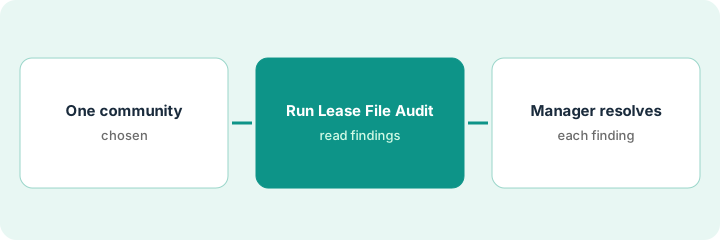
1. Step 1 — Pick one community
What it is: Choose one community where lease files are complete enough to audit and a manager can work findings daily.
- Pick one community for the first run.
- Confirm Lease File Audit is enabled (6 Oct 2026 release).
- Name the community manager who owns findings.
- Set a finish date for the first pass.
First run: Oakridge (220 units). Manager owns findings; regional compliance spot-checks.
Write “Community / Manager / Target finish date” before you click run.
2. Step 2 — Run Lease File Audit
What it is: Run the audit and export or list findings without closing them yet.
- Run Lease File Audit for that community.
- Export or list every finding.
- Sort by severity or lease start date.
- Do not bulk-dismiss findings.
Forty-two findings: missing addenda, unsigned pages, and a handful of expired proofs of insurance. List sorted by move-in date.
Save the raw finding list with a timestamp before anyone starts fixing.
3. Step 3 — Manager resolves and signs off each finding
What it is: The community manager fixes or documents each finding and signs off — no silent bulk clear.
- Work findings one by one.
- Fix the file or document why it is accepted.
- Sign off with name and date.
- Escalate legal questions to counsel.
- Re-run a sample after the pass.
Manager clears thirty-eight with corrected uploads; four wait on counsel for an addendum question. None are bulk-cleared.
Weekly standup: open findings count and oldest finding age.
Pricing context (October 2026)
This how-to isn't a price sheet. Per the Entrata AI review, Entrata is quote-only. Dated October 2026.
Checked Oct 15, 2026 on the vendor’s own pricing page: Entrata shows no public list price. Entrata’s site was not a public price sheet on our check; commercial terms are quote-only. This page quotes no Entrata dollar figure; confirm what your contract includes with Entrata or your admin.
Uncertainty: Confirm Lease File Audit is on in your community after the 6 Oct 2026 release. The only prices this site sells here are the optional $9 AI toolkit spreadsheet and $19 AI toolkit audit.
When this helps (honest take)
Useful when a community manager can work findings daily for two weeks.
Not useful when findings are bulk-dismissed to “finish” the audit.
Related options (educational)
| Need | Where to look | Why |
|---|---|---|
| Entrata AI | Entrata AI | Primary path |
| Yardi vs Entrata | Yardi vs Entrata | Side-by-side |
| Yardi Smart accounts payable | Yardi Smart accounts payable | Same day's how-to |
| Property ops stack map | Stack map: property ops | Where Entrata fits |
FAQ
When did Lease File Audit ship?
Per our review, it appears in Entrata’s 6 Oct 2026 release notes.
Can we bulk-clear low findings?
Not in this routine. Each finding gets a fix or a written accept.
Where do Entrata prices live?
Quote-only; see the pricing section. Our Oct 15, 2026 check of the vendor’s own pricing page is summarized in the pricing section above.
When did Lease File Audit ship?
Per our review, Lease File Audit appears in Entrata’s 6 Oct 2026 release notes. Confirm it is on in your community before you schedule the run.
Optional next step
If you want a one-page toolkit map for the tools you already pay for, use the optional $9 AI toolkit spreadsheet. If you want a short review of seat waste and unused tools, use the optional $19 AI toolkit audit. Neither is required to follow this how-to.