How-to · Workplace AI · Amazon Q Business · Oct 19, 2026
Pilot Amazon Q Business on three approved sources, and grade it on ten real questions before rollout
Amazon Q Business can answer workplace questions from sources your IT team approves inside AWS. A confident answer from the wrong document still misleads ops. This page shows how to pilot three sources and grade ten questions before anyone treats it as the company brain.
Who this is for
Ops and IT leads whose content already lives in AWS-centered, identity-controlled sources. The job here is a scored pilot before rollout.
How to do it
This is a how-to, not a ranking of workplace assistants. Per the Amazon Q Business review, Q Business is for workplace answers from AWS/IT-approved sources with a pilot pattern of three sources, ten eval questions, and success criteria. The ground rule: no broad rollout until the graded pilot passes written criteria.
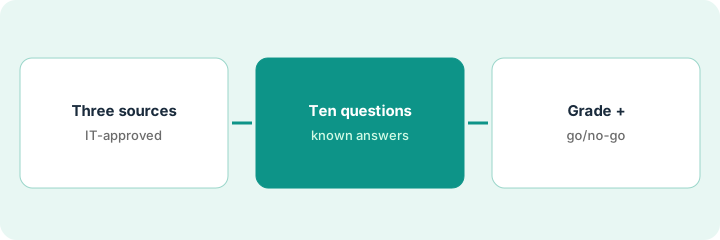
1. Pick three IT-approved sources
What it is: Choose three sources IT already allows (for example a policy wiki, a runbook bucket, and a ticket export), and refuse anything without an owner.
- Name each source and its owner.
- Confirm identity and access controls on each.
- Prefer current runbooks over stale slide decks.
- Document what is out of scope for the pilot.
- Keep personal drives out unless IT explicitly approves.
IT approves the Confluence ops space, an S3 runbook bucket, and a sanitized ServiceNow knowledge export. Shared drives stay out.
Write three source names and owners before you index anything.
2. Write ten eval questions with known answers
What it is: Write ten questions your team asks weekly, with the known-good answer and the source section cited.
- Cover policies, how-tos, and “who owns X.”
- Include two questions that should refuse or say unknown.
- Store expected answers offline so graders are not anchoring on the model.
- Assign two graders.
- Freeze the question list for the pilot week.
Questions include VPN reset steps, on-call escalation, and a trick question about a retired tool. Expected answers cite runbook headings.
Write ten questions and expected answers in a sheet before the first chat.
3. Grade answers and decide go/no-go
What it is: Run the ten questions, grade grounded / partial / fail, and decide go or no-go on criteria you wrote before seeing scores.
- Grade citation quality, not just fluency.
- Fail any answer that invents a policy.
- Require a written go/no-go with an owner.
- If no-go, fix sources or questions before a second pilot.
- Only then expand sources.
Seven grounded, two partial, one fail on the retired-tool question (it invented a how-to). Ops marks no-go until that source is removed.
Grade all ten before anyone announces a rollout date.
Pricing context (October 2026)
This how-to isn’t a price sheet. Per Amazon’s Q Business pricing page (checked Oct 19, 2026), Amazon Q Business Lite is listed at $3 per user per month and Pro at $20 per user per month; index and consumption charges are separate. Confirm capacity on AWS’s pricing page. Dated October 2026.
Checked Oct 19, 2026 on the vendor’s own pricing page: Amazon Q Business pricing lists Lite at $3 per user per month and Pro at $20 per user per month; index and consumption charges are separate.
Uncertainty: The only prices this site sells here are the optional $9 AI toolkit spreadsheet and $19 AI toolkit audit.
When this helps (honest take)
Useful when ops questions should hit IT-approved AWS-centered corpora and you will score a pilot first.
Not useful when Microsoft or Google workplace seats already answer the same questions well, or sources are unowned.
Related options (educational)
| Need | Where to look | Why |
|---|---|---|
| Amazon Q Business | Amazon Q Business | Primary path |
| IT stack map | Stack map: IT ops | Where Q Business fits |
FAQ
Should we index everything first?
No. Start with three owned sources and expand only after a graded pass.
How much does Amazon Q Business cost?
AWS lists Lite at $3 and Pro at $20 per user per month (checked Oct 19, 2026), plus index/consumption charges. Confirm on AWS’s pricing page.
Optional next step
If you want a one-page toolkit map for the tools you already pay for, use the optional $9 AI toolkit spreadsheet. If you want a short review of seat waste and unused tools, use the optional $19 AI toolkit audit. Neither is required to follow this how-to.