How-to · Paid ads · AdCreative.ai · Oct 22, 2026
Turn one ad brief into AdCreative.ai variants, and only pay for downloads you actually launch
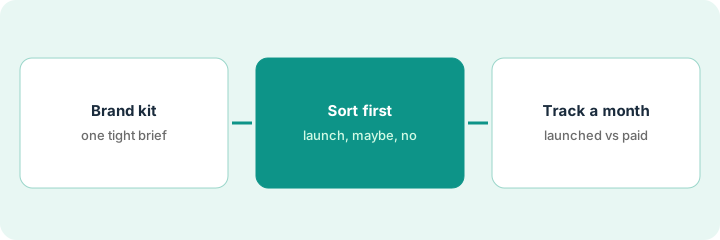
AdCreative.ai turns a brief and a brand kit into many ad variants sized for common placements, and downloads are metered by credits. The real cost is credits spent on ads you actually launch, not the sticker price. This page shows how to run one brief, sort variants before you download, and track launched versus downloaded for one billing month.
Who this is for
Marketers, founders, and small teams who already buy paid social or display ads and spend designer or Canva hours on each new variant. The job here is one brief, one placement, and an honest count of what launches. For drafting campaign copy in Jasper with Brand Voice — a different job (copy, not ad images) — see Jasper Brand Voice campaign.
How to do it
This is a how-to, not a ranking of ad tools. Per the AdCreative.ai review, you load brand colors, logo, and product messaging so variants stay on-brand, generate many creative angles and sizes for feed, story, and display, and download with credits; unused credits may expire, so read the vendor terms. Some tiers market predictive scores or insights; the review treats them as a hypothesis helper, and your ad account data still wins. The ground rule: weak briefs produce generic ads, so fix the brief before you spend more credits, and a person picks what launches and checks every claim.
1. Set the brand kit and write one tight brief
What it is: The brand kit is required setup, not optional polish. Load the logo, brand colors, and a three-sentence offer, then generate a small batch and check it before spending more credits.
- Load the logo, brand colors, and product messaging into the brand kit.
- Write the offer in three sentences that match your landing page.
- Generate five variants as a test.
- Check each: logo readable, claim matches the landing page, no invented features.
The founder loads the logo and colors and writes a three-sentence offer. Of five test variants, two show a discount the landing page does not offer. She rewrites the offer line to name the real first-box price wording from the site before generating more.
Load your brand kit, write a three-sentence offer that matches your landing page, generate five variants, and fix the brief if any variant shows a claim your page does not make.
2. Generate for one placement and sort before you download
What it is: Generate ten variants for a single placement and sort them into launch, maybe, and discard before downloading. Download only the launch set.
- Pick one placement, such as a feed ad for one campaign.
- Generate ten variants from the fixed brief.
- Sort them into launch, maybe, and discard with one reason each.
- Download only the launch set and note the credits used.
The marketing manager generates ten feed variants for a class promotion. Three go to launch, two to maybe, five to discard (stock photos that do not look like the studios). She downloads the three and notes the credits spent.
Generate ten variants for one placement, sort them into launch, maybe, and discard before downloading, and download only the launch set.
3. Track downloaded versus launched for one billing month
What it is: Unit cost is credits used on ads that actually launch. Keep a simple sheet for one billing month and tighten the brief before upgrading if launched is far below downloaded.
- Make a sheet with three columns: credits used, creatives launched, creatives that got spend.
- Fill it weekly for one billing month.
- If launched is far below downloaded, tighten the brief before any plan change.
- Compare the month with the Canva or ChatGPT image workflow you already have.
After a month the sheet shows 40 downloads, 12 launched, and 9 that got spend. The marketer tightens the brief and stays on the current plan instead of upgrading, then rechecks next month.
Keep a sheet of credits used, creatives launched, and creatives that got spend for one billing month, and tighten the brief before you upgrade if launched is far below downloaded.
Pricing context (October 2026)
This how-to isn’t a price sheet. Per the AdCreative.ai review, plans meter downloads with credits and unused credits may expire. We rechecked the review’s September 2026 plan prices on AdCreative.ai’s own site on Oct 22, 2026 (below); the review notes pricing lives on the home page rather than a stable pricing address. Dated October 2026.
Checked Oct 22, 2026 on the vendor’s own site: AdCreative.ai’s home page lists Starter at $39/month, Professional at $249/month, and Ultimate at $999/month on monthly billing, with lower rates for quarterly and yearly billing and a custom Enterprise plan (September 2026, per our review; checked Oct 22). AdCreative.ai has no working pricing address (adcreative.ai/pricing returned not found); prices are on its home page.
Uncertainty: The only prices this site sells here are the optional $9 AI toolkit spreadsheet and $19 AI toolkit audit.
When this helps (honest take)
Useful when you buy ads every week, someone will launch and kill variants on a schedule, and you will track what launches against what you download.
Not useful when you have little or no ad spend, downloads pile up unused, or a designer with Canva already covers your cadence.
Related options (educational)
| Need | Where to look | Why |
|---|---|---|
| High-volume ad variants with a brand kit | AdCreative.ai | Primary path; credit-metered downloads |
| General design templates and team editing | Canva Magic Studio | Humans assemble most creatives |
| Campaign copy in a saved Brand Voice | Jasper Brand Voice campaign | A different job |
| Where ecommerce marketing tools fit | Stack map: ecommerce ops | Broader map |
FAQ
What is AdCreative.ai?
A tool that generates paid-ad creative variants from a brief and brand assets, so you can test more ads without designing each by hand.
Should I trust the predictive scores?
Per our review, treat scores or insights as a hypothesis helper. Run a top-scored and a mid-scored creative with equal budget and prefer what your ad account shows.
Do unused credits roll over?
Our review says unused credits may expire. Read the vendor terms before you buy a larger plan.
What do AdCreative.ai plans cost?
On Oct 22, 2026 AdCreative.ai’s site listed Starter at $39 a month, Professional at $249 a month, and Ultimate at $999 a month on monthly billing (September 2026, per our review; checked Oct 22).
Optional next step
If you want a one-page toolkit map for the tools you already pay for, use the optional $9 AI toolkit spreadsheet. If you want a short review of seat waste and unused tools, use the optional $19 AI toolkit audit. Neither is required to follow this how-to.