Tool · Ops & automation · AI email
Shortwave review (Sep 2026): AI email for ops inboxes
AI inbox for ops who live in Gmail — summaries/drafts; vs Superhuman/Gemini in Gmail. Companion to Slack AI, ChatGPT, and Gemini reviews.
What Shortwave is (AI inbox on Gmail)
Shortwave is an AI-oriented email client that sits on Gmail. For ops, the job is not “another writing model” — it is clearing vendor, renewals, hiring, and logistics threads with summaries and draft replies without leaving inbox work. Compare honestly to Superhuman (speed-first client) and Gemini in Gmail (native Google assist — see Gemini). Chat-side drafting can still live in ChatGPT; channel work often stays in Slack AI.
Major features (with how someone uses them)
Examples at a glance: each feature has a concrete ops example plus a short Try this.
1. Thread summaries
What it is: Compress a long vendor or renewals thread into a few bullets so you know what changed before you draft. Ground the summary in the paste — do not invent deadlines.
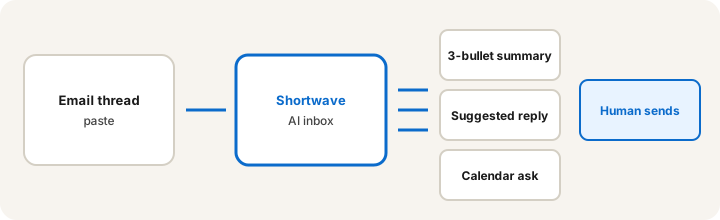
Primary SoT workflow:
From this email thread paste: 3-bullet summary, suggested reply (120 words), and calendar ask if a meeting is implied.
2. Suggested replies (human sends)
What it is: Draft a short reply from the thread. Cap length, forbid inventing commitments, and keep money/legal sends human. Treat output as a draft until you hit send.
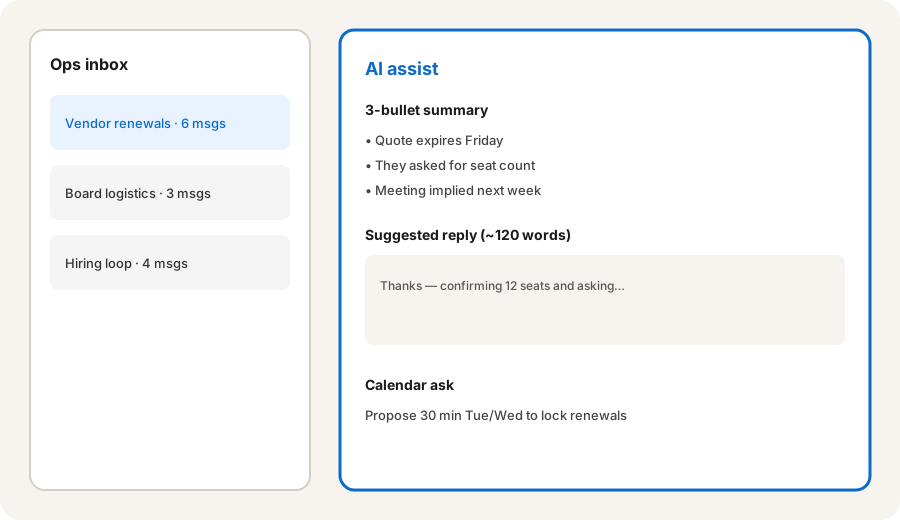
Draft guardrails:
Draft a reply under 120 words. Confirm only facts present in the thread. Leave blanks for seat count or dates if missing. Do not approve payment, sign a contract, or invent a meeting time.
3. Calendar ask when a meeting is implied
What it is: If the thread implies a call, draft a short calendar ask with two time options — still a draft until the human confirms availability. Do not auto-book without a person.
If a meeting is implied:
If this thread implies a meeting, draft a 3-sentence calendar ask with two weekday options and a 30-minute default. If no meeting is implied, write: No calendar ask needed.
4. Vs Superhuman / Gemini in Gmail
What it is: Educational boundary, not a ranking. Shortwave = AI-first Gmail client. Superhuman = speed-oriented client with AI assists (separate paid seat). Gemini in Gmail = stay inside Google Workspace with native assist (Gemini review). Many ops teams already pay for Google; adding Shortwave or Superhuman is another seat to justify.
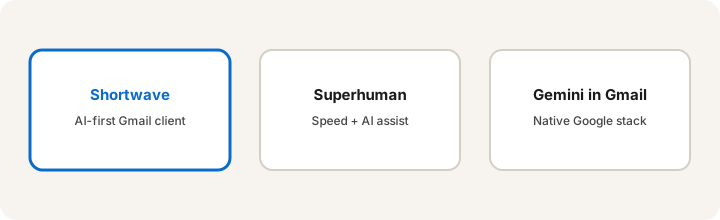
Same thread in your current stack:
Run the same thread prompt (3-bullet summary + 120-word reply + calendar ask if implied) in Shortwave-style assist AND in Gemini-in-Gmail (or your current client). Note which draft needs less editing before you would send.
Pricing context (September 2026)
Shortwave plans, AI limits, and Gmail sync features change. Public pages list free and paid tiers; verify dollars and caps on shortwave.com (and any linked pricing page) before budgeting. Superhuman and Google Workspace Gemini entitlements are separate SKUs — do not assume one price covers all three.
Uncertainty: AI feature gates, team admin, and Google security reviews vary by workspace. Confirm with IT before routing customer or finance mail through a new client.
When Shortwave is useful (honest take)
Useful when ops lives in Gmail threads (vendors, renewals, logistics) and wants summaries + drafts in the inbox loop. Less useful when the real bottleneck is Slack channels (Slack AI), long-form drafting in ChatGPT, or when Gemini-in-Gmail already covers light assist and you do not want another seat. Never let AI auto-send money or legal replies.
Paying for Shortwave and a few other AI tools? The $9 AI toolkit spreadsheet lists every AI subscription you have, what each one costs, and how fast it pays for itself, so you can see which ones are worth the money.
Want someone to do it for you? AI toolkit audit — $19
Related options (educational)
| Need | Better home | Why |
|---|---|---|
| Gmail thread summary + draft | Shortwave (or similar AI client) | Inbox-native assist for ops who live in email |
| Stay inside Google Workspace | Gemini in Gmail · Gemini | No new client; native entitlements |
| Speed-first power client | Superhuman | Keyboard speed + AI; separate seat |
| Channel summaries | Slack AI | Ops already in Slack, not Gmail |
| Long-form draft outside inbox | ChatGPT | Paste thread → draft when client AI is weak |
FAQ
What is Shortwave for ops?
An AI-first email client on Gmail for people who live in inbox work — thread summaries, draft replies, and related assists for renewals, vendors, and logistics threads.
How does Shortwave compare to Superhuman or Gemini in Gmail?
Superhuman emphasizes speed with AI assists. Gemini in Gmail stays native to Google. Shortwave is a dedicated AI inbox client. Choose client vs native vs power client — not a brand ranking.
Should AI send email for me?
No for money, legal, or customer-sensitive sends. Use AI for summary and draft; a human reviews and hits send.
Where is Shortwave pricing?
Confirm on shortwave.com. This review is dated September 2026.
Optional next step (if seats overlap)
If Shortwave would sit beside Gemini, Superhuman, Slack AI, and ChatGPT seats, optional help mapping overlap: $19 AI toolkit audit or $9 AI toolkit spreadsheet. Email Audit $19 or Toolkit spreadsheet $9.
Checkout is live via Stripe. After you pay, we email delivery (spreadsheet) or intake next steps (audit).